2026.2.2 SHCTF
2026-08-22 20:17:34

阶段一

📎 相关:
| 1.图片隐写
| 4.压缩包分析
| 4.1已知明文攻击(bkcrack)
| Misc tools
| 6.流量分析
| 6.2USB 键鼠流量
| 5.AI越狱

Evan

binwalk提取 然后修复伪加密

SHCTF{Evan_1s_s0_h4nds0me!}

office

20260202SHCTF-01

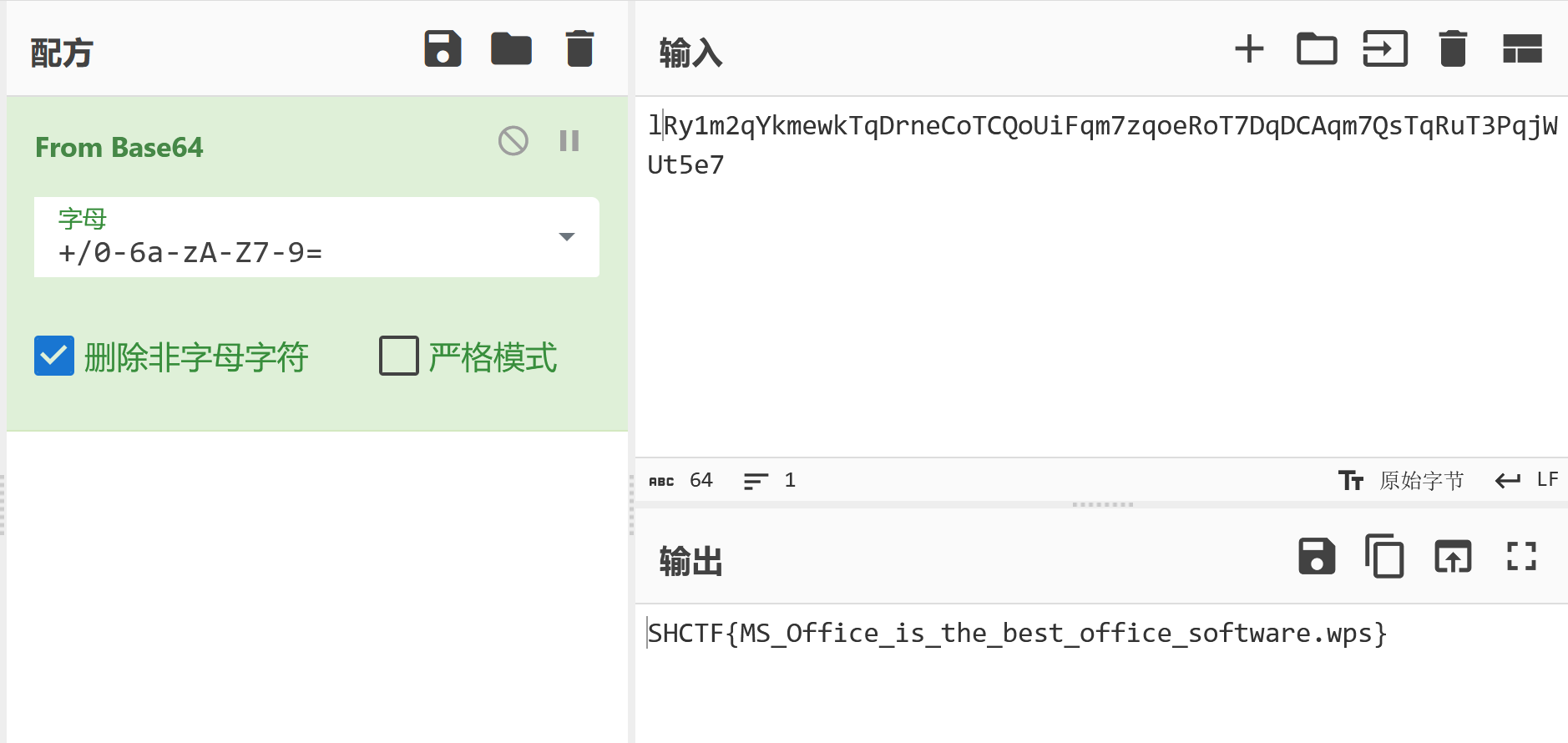
SHCTF{MS_Office_is_the_best_office_software.wps}

Open my puff

20260202SHCTF-02

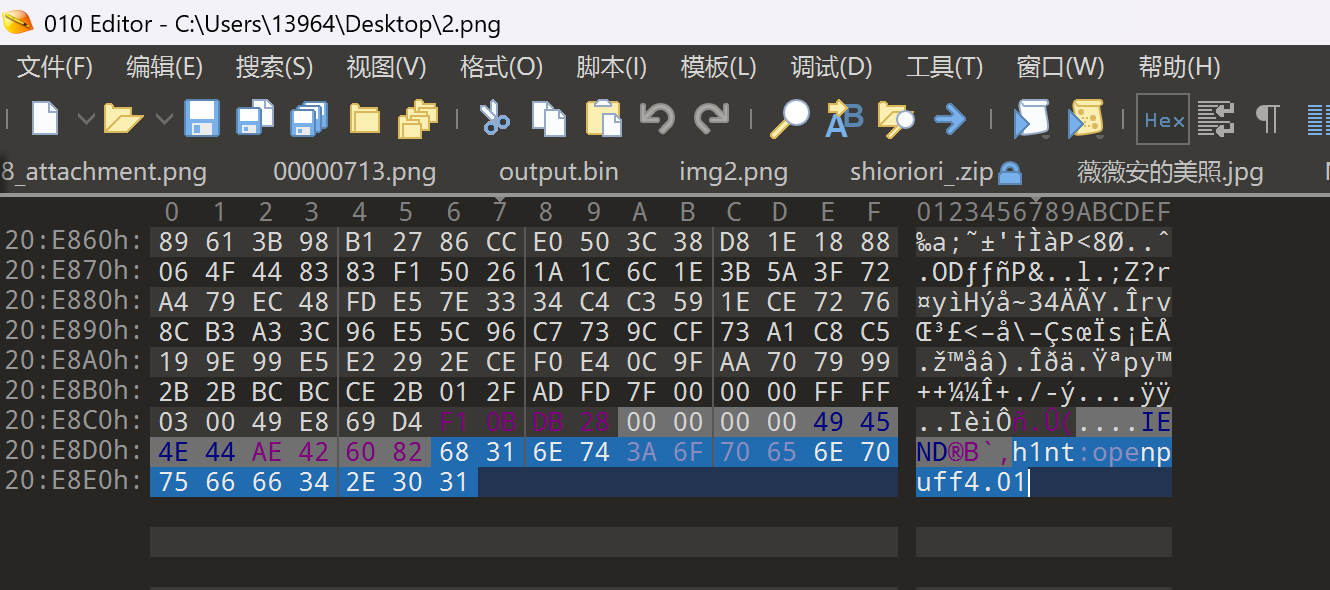
图片在010末尾

20260202SHCTF-03

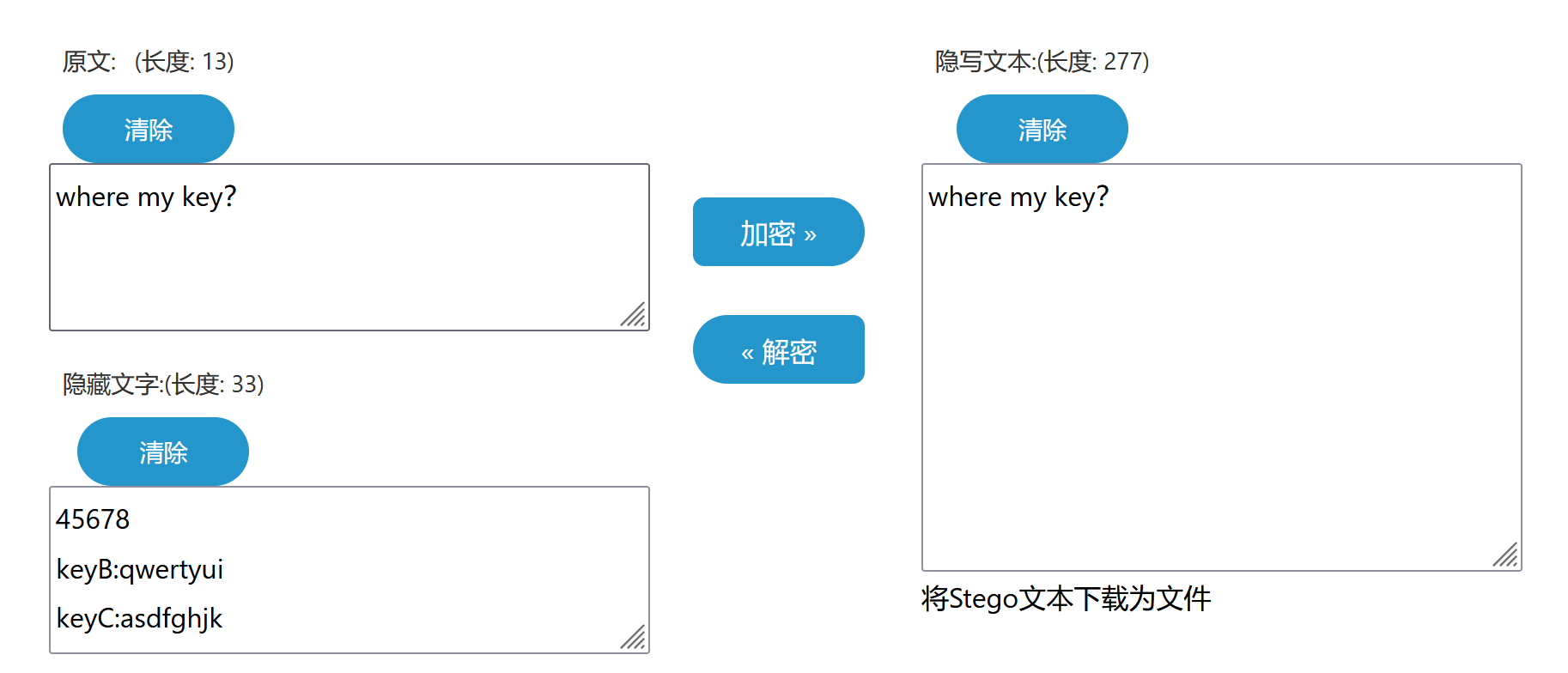
安装openpuff 4.01版本

keyB:qwertyui

keyC:asdfghjk

keyA至少也要八字节 原来说是45678 那在键盘上就是12345678

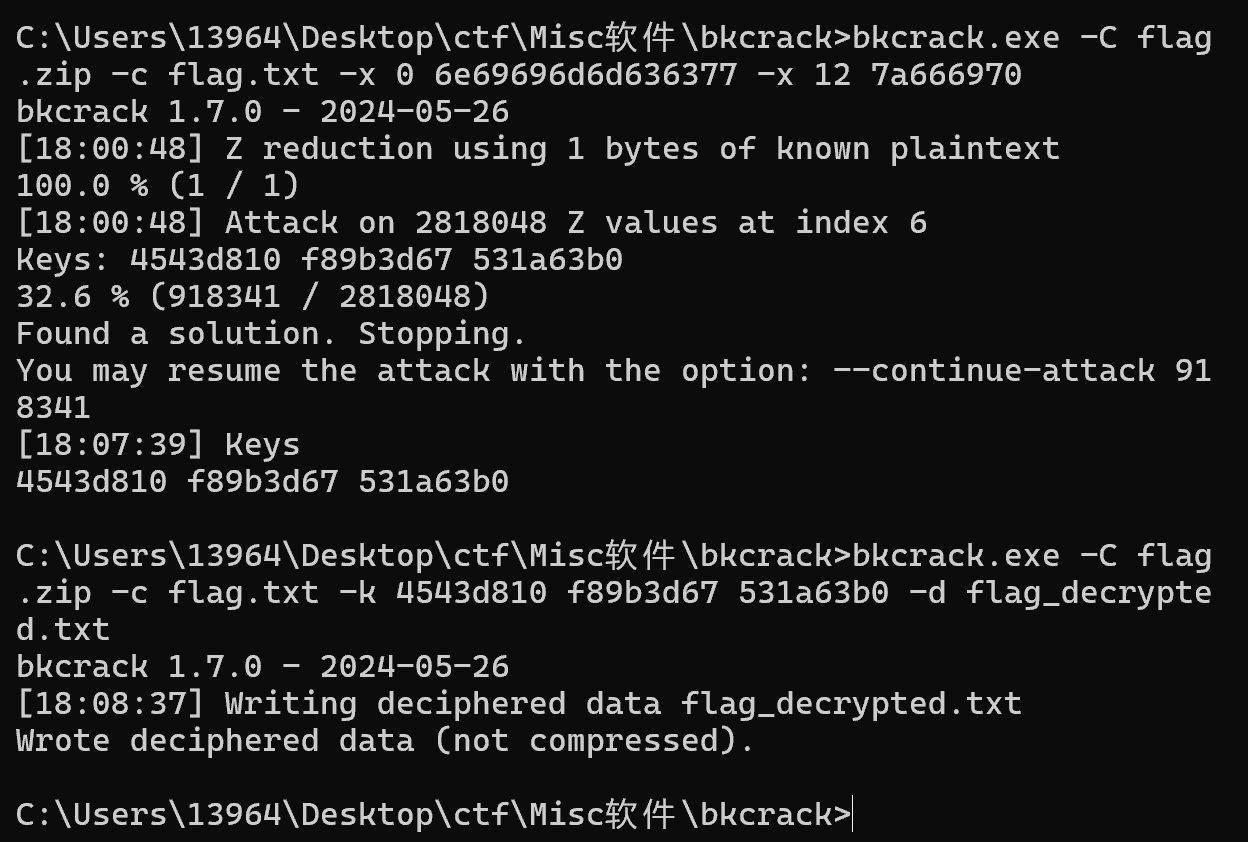
提取获得一个加密文档 已知明文攻击

20260202SHCTF-04

SHCTF{N3ur4l_Gl1tch_1n_Th3_5yst3m}

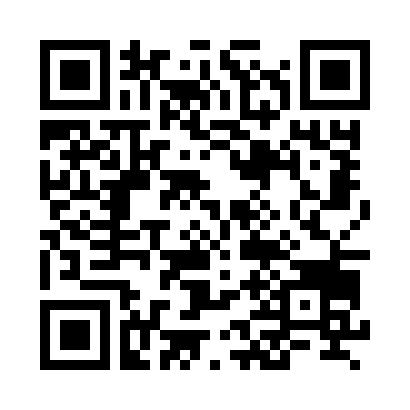
*不止二维码

stegsolve 看到不同的二维码 扫描获得

FLAG_PART_1:SHCTF{55a23d24-

FLAG_PART_2:ABBB/AABBB/AAAAA/BBBBB/ABBBBA/BBBBA/B/AABBB/ABBB

FLAG_PART_3: MkZkbDg3ZlY3ZEQxalNGenQyZUFYT3E0NmRrTXFV

1
2
3
Base混合多重解码:
[解码4次] Base64 -> Base62 -> Base58 -> Base32
混合解码结果:-942e-bdd}

flag2摩斯密码 如果不对的话-和·替换一下

-... --... ----- ..... -....- ....- . --... -...

B705-4E7B然后然后 还要转小写

SHCTF{55a23d24-b705-4e7b-942e-bdd}

薇薇安的美照

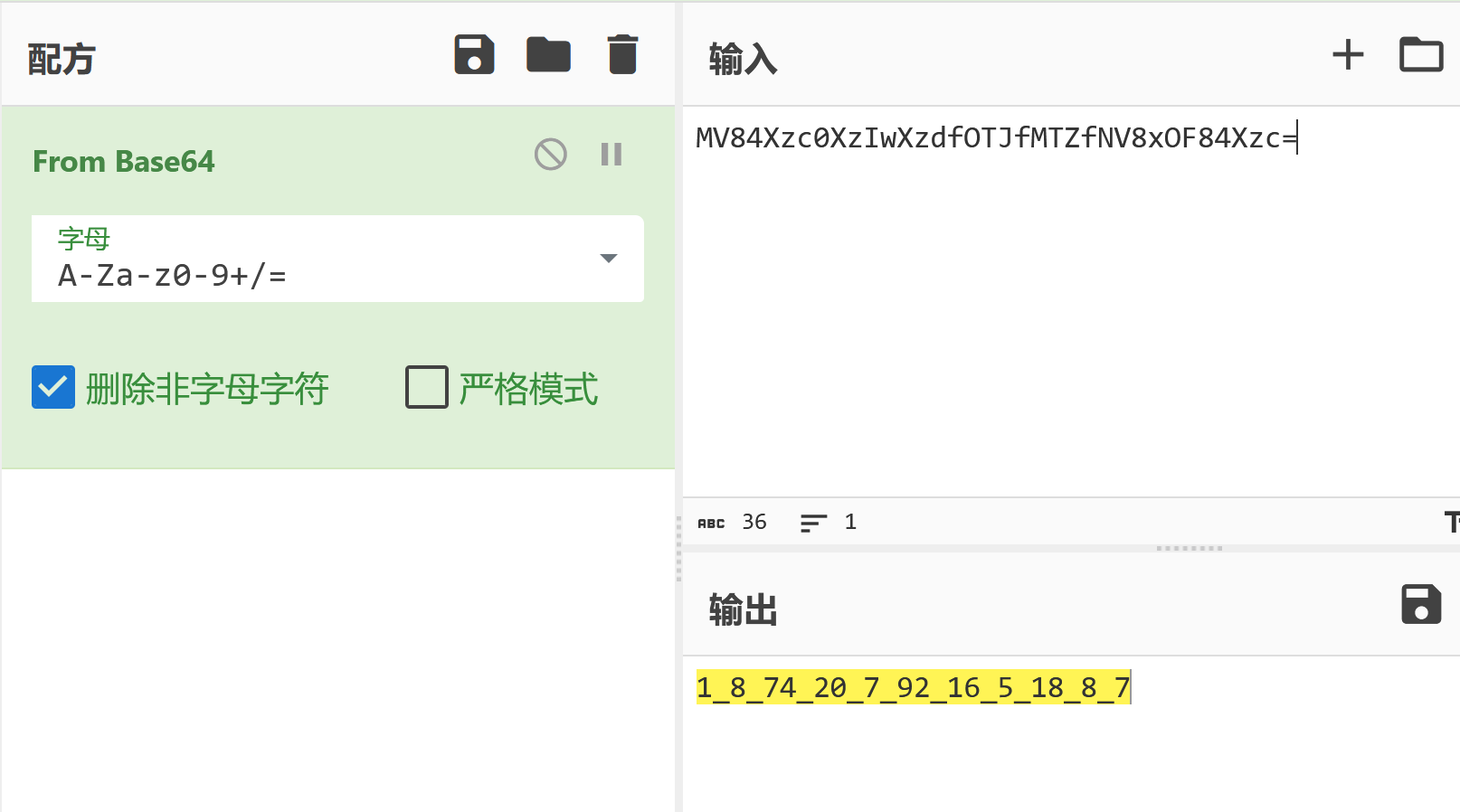
图片末尾附带SHCTF{MV84Xzc0XzIwXzdfOTJfMTZfNV8xOF84Xzc=}

base64解码括号里的内容

20260202SHCTF-05

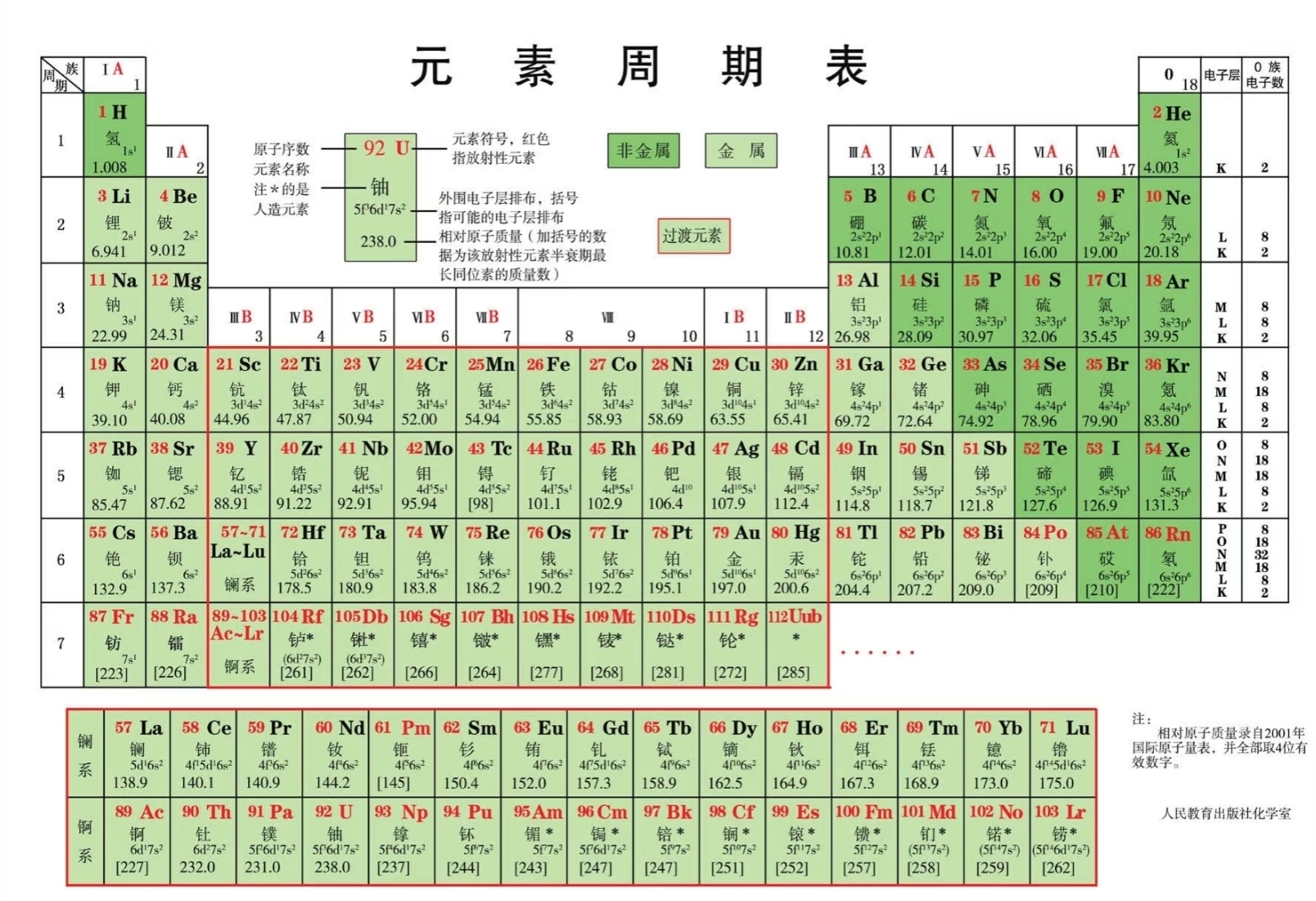
一开始没看好好看题干在那里瞎蒙方法 实际上是 元素周期表加密

20260202SHCTF-06

SHCTF{H_O_W_CA_N_U_S_B_AR_O_N}

*资源平权!

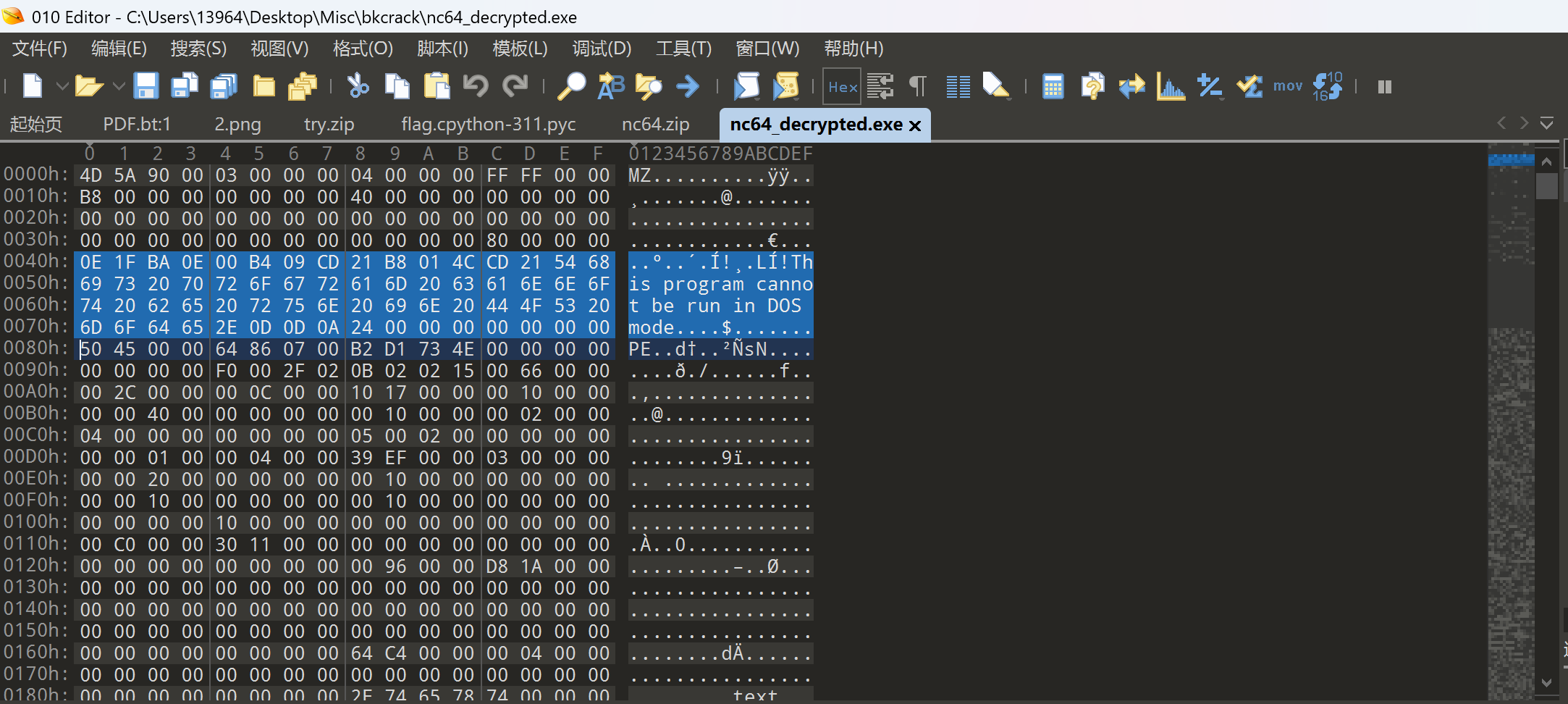
EXE文件默认加密情况下,不太会以store方式被加密,但它文件格式中的的明文及其明显,长度足够。如果加密ZIP压缩包出现以store算法存储的EXE格式文件,很容易进行破解。

大部分exe中都有这相同一段,且偏移固定为64:

20260202SHCTF-07

1
2
3
4
5
6
7
8
9
10
11
12
13
14
15
16
17
18
19
20
21
22
C:\Users\13964>cd C:\Users\13964\Desktop\Misc\bkcrack

C:\Users\13964\Desktop\Misc\bkcrack>powershell -Command "$hex = '0E1FBA0E00B409CD21B8014CCD21546869732070726F6772616D2063616E6E6F742062652072756E20696E20444F53206D6F64652E0D0D0A2400000000000000'; $bytes = -split ($hex -replace '..', '0x$& ') | ForEach-Object { [byte]$_ }; [IO.File]::WriteAllBytes('mingwen', $bytes)"

C:\Users\13964\Desktop\Misc\bkcrack>bkcrack.exe -C CrackM3.zip -c flag.exe -p mingwen -o 64
bkcrack 1.7.0 - 2024-05-26
[17:16:28] Z reduction using 56 bytes of known plaintext
100.0 % (56 / 56)
[17:16:29] Attack on 140645 Z values at index 71
Keys: 60101051 4cba82cb 48eac20c
33.4 % (47010 / 140645)
Found a solution. Stopping.
You may resume the attack with the option: --continue-attack 47010
[17:16:51] Keys
60101051 4cba82cb 48eac20c

C:\Users\13964\Desktop\Misc\bkcrack>bkcrack.exe -C CrackM3.zip -c flag.exe -k 60101051 4cba82cb 48eac20c -d flag_decrypted.exe
bkcrack 1.7.0 - 2024-05-26
[17:18:08] Writing deciphered data flag_decrypted.exe
Wrote deciphered data (not compressed).

C:\Users\13964\Desktop\Misc\bkcrack>

SHCTF{002c158f-b4d2-4e14-bbbb-b5141bca8cb9}

阶段二

Base64Encryption

png.png.enc

1

flag.zip.enc

1
2
7RA8yyYKKYy/K8nGY+VauAk5oKKKK8QKKKKTKKAKbheSbnH19JYDboH/KbOJKKRKY778KK8NGw3Yg2c4b0lUZTUJr8re0brVhFec8PqlthSpmXAAPnRd8istg2WoEG38OveV+0O+JUN8UZ4xSBqd4HMTJAaK9el8cJOyCELEAoVvtGv5mlJrDePu9dT27RAyKSYKIKKyKkTKBC+86TlsQm0UKKKKBKKKKKQKrQKKKKKKKKKKKam
yKKKKKkbAUoPDGJS1ahZDUQkbyQKyKRIIKQKK7RAIypKKKKKyKKRKiYKKKw1KKKKKKK==

readme.txt

1
看我把Base64的字符表全都打乱了!只要别人解不开,那就是加密?b4CYzZ3RWg7pBuTyVmGrxaHhjtQMUqEno5XJscD/1d892vO+Pfk6NewlFLSKiI0A(是打乱后的BASE64表)

Pasted image 20260813155954.png
f532cb3ce40a8fe8f1123b33d28d8ed0.png
这个二维码实际上可以直接扫描,直接扫描二维码可能会得到提示信息 There is no password here.,只要换个角度再扫扫,就能得到 ZIP 码 base64_15_n0t_3ncrypt10n
原理是正常的二维码天生设计成360°全方向可扫 但是这幅对二维码做了特殊处理 核心是破坏或利用二维码的方向判定机制

ezAI

20260202SHCTF-08

*Structured Chaos

打开题目给的 Structured Chaos.png看到

1
2
3
4
5
6
7
8
9
┌─────┬─────┬─────┬─────┐
│ QR1 │ QR2 │ QR3 │ QR4 │
├─────┼─────┼─────┼─────┤
│ QR5 │ QR6 │ QR7 │ QR8 │
├─────┼─────┼─────┼─────┤
│ QR9 │QR10 │QR11 │QR12 │
├─────┼─────┼─────┼─────┤
│QR13 │QR14 │QR15 │(空) │
└─────┴─────┴─────┴─────┘

一张大图,里面有 15 个二维码,排成 4×4 的网格,右下角空出来。

用手机扫任意一个 QR 码,发现扫出来的内容是乱码或者一段奇怪的数据,并不是完整的信息。

这正是 QR 码结构化拼接模式的特征:单独扫一个片段,得到的是残缺数据。

  • Structured:暗示 QR 码的 Structured Append(结构化拼接) 标准
  • Chaos:暗示顺序是乱的,需要还原

QR码的结构化拼接(Structured Append)

单个 QR 码容量有限(版本 40 最大 2953 字节),大文件要用 Structured Append 分段存(最多 16 片)。这题把 15 片打乱排进 4×4 网格,右下角空着,单独扫任何一片都是残缺数据。

每个片段数据流开头有 20 位 SA Header:

1
2
3
4
位  1-4  :模式指示符 = 0011(固定,SA 模式)
位 5-8 :序号 = 第几片(0000=第0片 ... 1110=第14片)
位 9-12 :总片数-1
位 13-20 :奇偶校验

流程:切 15 块 → zxing-cpp 解码拿字节和掩码编号 → 按掩码去掩码、从右下角 Z 字形读数据区 → 提 SA 序号 → 按序号拼 → 拼出来是 PNG 就递归下一层,直到文本。

exp

1
2
3
4
5
6
7
8
9
10
11
12
13
14
15
16
17
18
19
20
21
22
23
24
25
26
27
28
29
30
31
32
33
34
35
36
37
38
39
40
41
42
43
44
45
46
47
48
49
50
51
52
53
54
55
56
57
58
59
60
61
62
63
64
65
66
67
68
69
70
71
72
73
74
75
76
77
78
79
80
81
82
83
84
85
86
87
88
89
90
91
92
93
94
95
96
97
98
99
100
101
102
103
104
105
106
107
108
109
110
111
112
113
114
115
116
117
118
119
120
121
122
123
124
125
126
127
128
129
130
131
132
133
134
135
136
137
138
139
140
141
142
143
144
145
146
147
148
149
150
151
152
153
154
155
156
157
158
159
160
161
162
163
164
165
166
167
168
169
170
171
172
173
174
175
176
177
178
179
180
181
182
183
184
185
186
187
188
189
190
191
192
193
194
195
196
197
198
199
200
201
202
203
204
205
206
207
208
209
210
211
212
213
214
215
216
217
218
219
220
221
222
223
224
225
226
227
228
229
230
231
232
233
234
235
236
237
238
239
240
241
242
243
244
245
246
247
248
249
250
251
252
253
254
255
256
257
258
259
260
261
262
263
264
265
266
267
268
269
270
271
272
import numpy as np
import zxingcpp
from PIL import Image


def get_mask_bit(r, c, mask):
"""
根据掩码编号和坐标,判断该位置是否需要翻转(掩码值是否为1)

参数:
r: 行坐标
c: 列坐标
mask: 掩码编号(0-7)

返回:
True 表示该位置掩码为1,需要翻转
False 表示该位置掩码为0,不需要翻转
"""
if mask == 0:
return (r + c) % 2 == 0
elif mask == 1:
return r % 2 == 0
elif mask == 2:
return c % 3 == 0
elif mask == 3:
return (r + c) % 3 == 0
elif mask == 4:
return (r // 2 + c // 3) % 2 == 0
elif mask == 5:
return ((r * c) % 2 + (r * c) % 3) == 0
elif mask == 6:
return ((r * c) % 2 + (r * c) % 3) % 2 == 0
elif mask == 7:
return ((r * c) % 3 + (r + c) % 2) % 2 == 0
return False


def parse_sa_header(matrix, mask):
"""
从 QR 码矩阵中提取 Structured Append 序号

QR 码数据从右下角开始,按 zigzag 方向读取。
SA Header 是数据流的前 20 位,物理上对应矩阵右下角区域。

参数:
matrix: 二维 numpy 数组,1=黑色模块,0=白色模块
mask: 掩码编号(0-7)

返回:
序号整数(0-14);如果不是SA模式,返回 None
"""
n = len(matrix) # QR 码矩阵边长(模块数)
bits = [] # 收集去掩码后的原始位
coords = [] # 读取坐标列表

# 从右下角开始,沿最右边两列向上收集坐标
# QR 码数据读取是以"两列为一组"的zigzag方式
# 我们简化处理:只读最右边两列,对于SA Header已经足够
r = n - 1
c = n - 1
while len(coords) < 32 and r > 0:
coords.extend([(r, c), (r, c - 1)])
r -= 1

# 逐位读取,进行去掩码处理
for r, c in coords[:32]:
raw_val = int(matrix[r][c]) # 读取原始矩阵值(已被掩码处理过)
m = get_mask_bit(r, c, mask) # 判断该位置掩码是否为1

# 去掩码:如果掩码为1,翻转该位;否则保持不变
bit = (raw_val ^ 1) if m else raw_val
bits.append(str(bit))

# 拼接成二进制字符串
s = "".join(bits)

# 检查前4位是否为SA模式标识 "0011"
if s[:4] != "0011":
return None # 不是SA模式

# 第5-8位(索引4-7)是序号,转换为整数
seq_index = int(s[4:8], 2)
return seq_index


def get_logical_matrix(tile_arr, version):
"""
将 QR 码图像数组转换为标准尺寸的逻辑矩阵

参数:
tile_arr: 灰度图像的 numpy 数组
version: QR 码版本(1-40)

返回:
标准尺寸的二值矩阵(1=黑,0=白),或 None(如果图像为空)
"""
# 二值化:像素值 < 128 认为是黑色模块(值为1),否则为白色(值为0)
bin_img = np.where(tile_arr < 128, 1, 0).astype(np.uint8)

# 找到有内容的行和列(去掉周围的空白区域)
rows_has_content = np.any(bin_img, axis=1)
cols_has_content = np.any(bin_img, axis=0)

if not np.any(rows_has_content):
return None # 完全空白,跳过

# 裁剪出有内容的区域
ymin, ymax = np.where(rows_has_content)[0]0, -1
xmin, xmax = np.where(cols_has_content)[0]0, -1
cropped = tile_arr[ymin:ymax + 1, xmin:xmax + 1]

# QR 码的模块数(格子数)由版本决定:dim = 21 + (version-1) * 4
# 版本1:21×21,版本2:25×25,以此类推
dim = 21 + (version - 1) * 4

# 将裁剪后的图像缩放到精确的模块数尺寸
# 使用最近邻插值(NEAREST),保持黑白边界清晰
pil_img = Image.fromarray(cropped).resize((dim, dim), Image.Resampling.NEAREST)

# 转回二值矩阵
return np.where(np.array(pil_img) < 128, 1, 0)


def solve_layer(image_path):
"""
解码一层图片(可能包含网格状的多个QR码)

参数:
image_path: 图片文件路径

返回:
解码后的字节数据;失败返回 None
"""
# 以灰度模式打开图片('L'模式 = 8位灰度)
img = Image.open(image_path).convert('L')
arr = np.array(img)
h, w = arr.shape

print(f" 图片尺寸: {w} × {h} 像素")

# ── Step 1:找到网格格子大小 ──────────────────────────────────────────
# 寻找能同时整除图片宽和高的所有候选格子尺寸
divs = [d for d in range(40, min(h, w) + 1) if h % d == 0 and w % d == 0]
cell_size = 0

for d in divs:
# 取左上角第一个格子,加上10像素白边,尝试识别
tile = np.pad(arr[0:d, 0:d], 10, constant_values=255)
if zxingcpp.read_barcodes(tile):
cell_size = d
break

if cell_size == 0:
# 找不到网格,当作单个大QR码直接识别
print(" 未找到网格,尝试整图识别...")
res = zxingcpp.read_barcodes(arr)
return res[0].bytes if res else None

rows = h // cell_size # 行数
cols = w // cell_size # 列数
print(f" 网格: {rows} 行 × {cols} 列,格子大小: {cell_size}px")

# ── Step 2:逐格切割并识别 ──────────────────────────────────────────
chunks = [] # 存储 (序号, 字节数据) 的列表

for r in range(rows):
for c in range(cols):
# 切出当前格子
tile = arr[r * cell_size:(r + 1) * cell_size,
c * cell_size:(c + 1) * cell_size]

# 跳过空白格子(标准差很小说明几乎是纯色)
if np.std(tile) < 5:
print(f" 格子({r},{c}): 空白,跳过")
continue

# 加白边后识别(zxing 需要安静区才能正常工作)
padded_tile = np.pad(tile, 10, constant_values=255)
res_list = zxingcpp.read_barcodes(padded_tile)

if not res_list:
print(f" 格子({r},{c}): 识别失败!")
continue

res = res_list[0] # 取第一个识别结果

# ── Step 3:提取 SA 序号 ──────────────────────────────────────
seq_idx = -1
try:
# 从 extra 字段获取版本和掩码信息
meta = {str(k): v for k, v in res.extra.items()} \
if hasattr(res, 'extra') else {}

version = int(meta.get('Version', 1))
mask = int(meta.get('DataMask', 0))

# 获取标准化逻辑矩阵
logic_matrix = get_logical_matrix(tile, version)

# 从矩阵中解析SA序号
seq_idx = parse_sa_header(logic_matrix, mask)

except Exception as ex:
print(f" 格子({r},{c}): SA解析出错: {ex}")

print(f" 格子({r},{c}): SA序号={seq_idx}, 数据长度={len(res.bytes)}字节")
chunks.append((seq_idx, res.bytes))

if not chunks:
print(" 没有成功识别的格子!")
return None

# ── Step 4:按序号排序并拼接 ──────────────────────────────────────────
chunks.sort(key=lambda x: x[0])

print(f"\n 排序后的顺序: {[c[0] for c in chunks]}")

result = b"".join([c[1] for c in chunks])
print(f" 拼接后总长度: {len(result)} 字节")

return result


# ══════════════════════════════════════════════════════════════
# 主程序
# ══════════════════════════════════════════════════════════════

if __name__ == "__main__":
current_file = "Structured Chaos.png"
layer = 0

while True:
print(f"\n{'='*50}")
print(f" 第 {layer} 层处理: {current_file}")
print(f"{'='*50}")

data = solve_layer(current_file)

if not data:
print("\n[×] 解码失败,程序退出。")
break

# 根据文件头魔数判断数据类型
if data.startswith(b'\x89PNG\r\n\x1a\n'):
# PNG 文件魔数,保存为下一层图片
next_file = f"layer_{layer}.png"
with open(next_file, "wb") as f:
f.write(data)
print(f"\n[✓] 发现PNG数据,已保存为: {next_file}")
print(f" 进入下一层...")
current_file = next_file
layer += 1

elif data.startswith(b'flag') or data.startswith(b'FLAG'):
# 直接是flag
print(f"\n[★] 找到 FLAG: {data.decode('utf-8', errors='replace')}")
break

else:
# 未知格式,尝试作为文本打印
print(f"\n[?] 数据类型未知,尝试作为文本解析:")
try:
text = data.decode('utf-8')
print(f" {text}")
except:
print(f" (无法解码为UTF-8,原始十六进制前64字节:)")
print(f" {data[:64].hex()}")
break

print(f"\n{'='*50}")
print(" 处理完成")
print(f"{'='*50}")

奇怪的数据

1
2
3
4
5
6
7
8
9
10
11
12
13
14
15
16
17
18
19
20
21
22
23
24
25
26
27
28
29
30
31
32
33
34
35
36
37
38
39
40
41
42
43
44
45
46
47
48
49
50
51
52
53
54
55
56
from PIL import Image
import re
import math

# 读取 flag.txt 文件
with open('flag.txt', 'r') as f:
data = f.read()

# 提取所有 (R,G,B) 元组,注意转义括号
pixels = re.findall(r'\((\d+),(\d+),(\d+)\)', data)
if not pixels:
print("❌ 未找到任何像素数据!请检查 flag.txt 格式是否为 (R,G,B);...")
exit()

pixels = [(int(r), int(g), int(b)) for r, g, b in pixels]
total = len(pixels)
print(f"✅ 成功加载 {total} 个像素")

# 如果像素数为 0,退出
if total == 0:
print("❌ 像素数量为 0,无法生成图像。")
exit()

# 尝试找出合适的宽高:优先选择宽 >= 高,且宽高比在 0.5 ~ 2.0 之间(避免太窄或太高)
candidates = []
sqrt_n = int(math.isqrt(total))
# 从 sqrt(total) 向下和向上搜索因数
for w in range(sqrt_n, 0, -1):
if total % w == 0:
h = total // w
ratio = w / h
if 0.5 <= ratio <= 2.0: # 合理比例
candidates.append((w, h))
if len(candidates) >= 3:
break

# 如果没找到合适比例,尝试补白成方形
if not candidates:
print("⚠️ 未找到理想比例的尺寸,将使用方形图像(可能补白)")
size = math.isqrt(total)
if size * size < total:
size += 1
new_total = size * size
pixels.extend([(255, 255, 255)] * (new_total - total))
width = height = size
else:
# 选最接近正方形的那个(即 w 和 h 差值最小)
best = min(candidates, key=lambda wh: abs(wh[0] - wh[1]))
width, height = best
print(f"🔍 选择尺寸: {width} x {height} (比例: {width/height:.2f})")

# 创建并保存图像
img = Image.new('RGB', (width, height))
img.putdata(pixels[:width * height]) # 防止越界
img.save('flag.png')
print("🎉 图像已保存为 flag.png,请用图片查看器打开!")

获得二维码

20260202SHCTF-09

扫描 base64解码获得flag

SHCTF{Th3_Quest1on5_Are_Too_D1fficu1t!!!!}

*获取 SHSolver 之路

获得一张非常狭长的图片。隐写方式都试了一下,没有文件隐藏。

提示和QQ等级相关。

Step1:QQ等级规则

众所周知(?

QQ等级里

1
2
3
4
👑是64级
🌞是16级
🌙是4级
⭐是1级️

是一个以4为底的数字系统,但是权重是[64,16,4,1],对应高位到低位

标准base-4是(256,64,16,4,1...)

这里每行总值≤64*1+16*3+4*3+1*3=127正好是7-bit ASCII``(0~127)的最大值

所以猜测每一行=一个ASCII字符

step2:图像预处理

因为图像过于狭长,不可能手动提取每行内容

做一下图像预处理。把彩色图转成灰度图,再转成黑白。

黑色=背景。白色=图标像素。

对每一行求和→找出哪些行有内容(不是全黑→得到933行区域。说明有933行ASCII字符

对每一列求和→找出哪些列有内容→得到9列区域(这个不求和也可以 最多是127级的👑🌞🌞🌞🌙🌙🌙⭐⭐也就是9列

于是把图像切成933*9的网格单元格

step3:图标分类

切好了以后,每一个单元格可能包含一个图标,也可能为没有。

把每个非空单元格裁剪出来,缩放到16*16,转为二值数组(0/1),作为特征向量

用汉明距离聚类,相似的图标归为一类

最终得到4类图标,但是我们不知道分别哪个才是👑🌞🌙⭐

step4:确定图标优先级顺序

👑🌞🌙⭐的排列

从左到右是非递增的

所以我们可以列举4!=24种图标顺序。对每种顺序,检查所有933行是否满足“从左到右图标等级不升”

实际上只会有一种顺序满足条件,而这个就是正确的映射

最后的映射内容的顺序就是👑🌞🌙⭐

exp

1
2
3
4
5
6
7
8
9
10
11
12
13
14
15
16
17
18
19
20
21
22
23
24
25
26
27
28
29
30
31
32
33
34
35
36
37
38
39
40
41
42
43
44
45
46
47
48
49
50
51
52
53
54
55
56
57
58
59
60
61
62
63
64
65
66
67
68
69
70
71
72
73
74
75
76
77
78
79
80
81
82
83
84
85
86
87
88
89
90
91
92
93
94
95
96
97
98
99
100
101
102
103
104
105
106
107
108
109
110
111
112
113
114
115
116
117
118
119
120
121
122
123
124
125
126
127
128
129
130
131
132
133
134
135
136
137
138
139
140
141
142
143
144
145
146
147
148
149
150
151
import itertools as it
from pathlib import Path as P
import numpy as np
from PIL import Image as Im

# ===== 配置 =====
SCRIPT_DIR = P(__file__).resolve().parent
IMAGE_FILE = SCRIPT_DIR / "shsolver.jpg"

BINARY_THRESHOLD = 50
CLUSTER_DISTANCE = 30
ICON_SIZE = (16, 16)


def find_runs(binary_array):
runs = []
start = None
for i, val in enumerate(binary_array):
if val and start is None:
start = i
elif not val and start is not None:
runs.append((start, i - 1))
start = None
if start is not None:
runs.append((start, len(binary_array) - 1))
return runs


def load_image():
if not IMAGE_FILE.exists():
raise SystemExit(f"❌ 找不到图片: {IMAGE_FILE}\n请确保 'shsolver.jpg' 和脚本在同一目录。")
print(f"[+] 加载图像: {IMAGE_FILE}")
return Im.open(IMAGE_FILE).convert("L")


def cluster_icons(grid, row_ranges, col_ranges):
templates = []
indices_list = []

for ri, (r1, r2) in enumerate(row_ranges):
for ci, (c1, c2) in enumerate(col_ranges):
cell = grid[r1:r2 + 1, c1:c2 + 1]
if cell.sum() < 10:
continue

pil_cell = Im.fromarray((cell * 255).astype(np.uint8))
resized = pil_cell.resize(ICON_SIZE, Im.NEAREST)
binary_pattern = (np.array(resized) > BINARY_THRESHOLD).astype(np.uint8).flatten()

if not templates:
templates.append(binary_pattern)
indices_list.append([(ri, ci)])
continue

distances = [np.count_nonzero(binary_pattern != t) for t in templates]
min_dist = min(distances)
if min_dist <= CLUSTER_DISTANCE:
best_idx = distances.index(min_dist)
indices_list[best_idx].append((ri, ci))
else:
templates.append(binary_pattern)
indices_list.append([(ri, ci)])

return templates, indices_list


def determine_hierarchy(rows_patterns, labels):
for perm in it.permutations(labels):
rank_map = {icon: rank for rank, icon in enumerate(perm)}
valid = True
for pattern in rows_patterns:
prev_rank = -1
for icon in pattern:
curr_rank = rank_map[icon]
if prev_rank != -1 and curr_rank < prev_rank:
valid = False
break
prev_rank = curr_rank
if not valid:
break
if valid:
return perm
return None


def main():
# 1. 加载图像
img = load_image()
gray_array = np.array(img)
binary_grid = (gray_array > BINARY_THRESHOLD).astype(np.uint8)

# 2. 分割行/列
row_ranges = find_runs(binary_grid.sum(axis=1) > 0)
col_ranges = find_runs(binary_grid.sum(axis=0) > 0)
print(f"[+] 行数: {len(row_ranges)}, 列数: {len(col_ranges)}")

# 3. 聚类图标
templates, coords_list = cluster_icons(binary_grid, row_ranges, col_ranges)
if len(templates) != 4:
raise SystemExit(f"❌ 检测到 {len(templates)} 种图标,期望 4 种。")

# 4. 按频率分配临时标签 A(高频) → D(低频)
freq_order = sorted(range(4), key=lambda i: len(coords_list[i]), reverse=True)
labels = ["A", "B", "C", "D"]
coord_to_label = {}
for idx, cid in enumerate(freq_order):
for coord in coords_list[cid]:
coord_to_label[coord] = labels[idx]

# 5. 构建每行图标序列
row_patterns = []
for ri in range(len(row_ranges)):
seq = [coord_to_label[(ri, ci)] for ci in range(len(col_ranges)) if (ri, ci) in coord_to_label]
row_patterns.append(seq)

# 6. 确定正确顺序
order = determine_hierarchy(row_patterns, labels)
if not order:
raise SystemExit("❌ 无法确定图标层级顺序。")
print(f"[+] 图标层级(高→低): {order}")

# 7. 解码为 ASCII
weights = [64, 16, 4, 1]
weight_map = dict(zip(order, weights))

ascii_vals = []
for pattern in row_patterns:
total = sum(weight_map[icon] for icon in pattern)
ascii_vals.append(total)

# 8. 输出完整文本(不再做 Base64)
try:
decoded_text = bytes(ascii_vals).decode("latin1")
except Exception as e:
print(f"⚠️ 警告: 部分字节无法用 latin1 解码,改用 errors='replace'")
decoded_text = bytes(ascii_vals).decode("latin1", errors="replace")

print("\n" + "="*60)
print("✅ 完整解码文本如下(共 {} 行):".format(len(decoded_text.splitlines())))
print("="*60)
print(decoded_text)
print("="*60)

# 可选:保存到文件
output_file = SCRIPT_DIR / "decoded_output.txt"
output_file.write_text(decoded_text, encoding="latin1")
print(f"\n📄 已保存解码结果到: {output_file}")


if __name__ == "__main__":
main()
1
2
3
4
5
6
7
8
9
10
11
12
13
14
15
16
17
18
19
20
21
22
23
24
25
26
27
28
29
30
31
32
33
34
35
36
37
38
39
40
41
42
Windows PowerShell
版权所有(C) Microsoft Corporation。保留所有权利。

安装最新的 PowerShell,了解新功能和改进!https://aka.ms/PSWindows

PS C:\Users\13964\Desktop\shsolver> python 2.py
[+] 加载图像: C:\Users\13964\Desktop\shsolver\shsolver.jpg
[+] 行数: 932, 列数: 9
[+] 图标层级(高→低): ('D', 'A', 'B', 'C')

============================================================
✅ 完整解码文本如下(共 25 行):
============================================================
New York is 3 hours ahead of California,
but it does not make California slow.
Someone graduated at the age of 22,
but waited 5 years before securing a good job!
Someone became a CEO at 25,
and died at 50.
While another became a CEO at 50,
and lived to 90 years.
Here is your gift (please remove all spaces):
fTFhcF 9MdT FQM TNoX0Ff ckV0VVB tT2Nf UlU weV8z S0BNe 0ZUQ0hT
Someone is still single,
while someone else got married.
Obama retires at 55,
but Trump starts at 70.
Absolutely everyone in this world works based on their Time Zone.
People around you might seem to go ahead of you,
some might seem to be behind you.
But everyone is running their own RACE, in their own TIME.
Don't envy them or mock them.
They are in their TIME ZONE, and you are in yours!
Life is about waiting for the right moment to act.
So, RELAX.
You're not LATE.
You're not EARLY.
You are very much ON TIME, and in your TIME ZONE Destiny set up for you.
============================================================

📄 已保存解码结果到: C:\Users\13964\Desktop\shsolver\decoded_output.txt
PS C:\Users\13964\Desktop\shsolver>

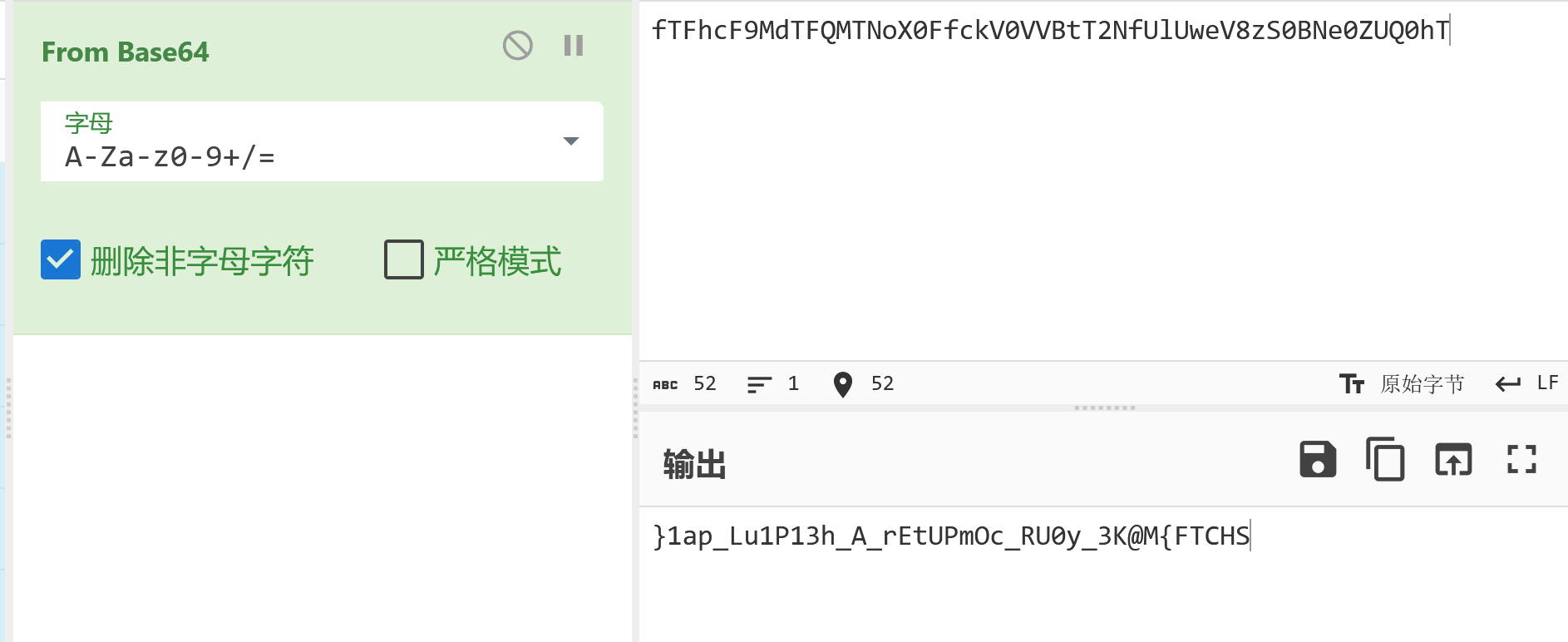
先消除空格 再把获得内容反转 获得flag

20260202SHCTF-10

SHCTF{M@K3_y0UR_cOmPUtEr_A_h31P1uL_pa1}

上一页
2026-08-22 20:17:34
下一页